For SME developers and their partners
From start on site to handover.
Sixteen ready-to-use tools for planning, running and reporting on site, built by professionals who have set up sites and driven build programmes through to handover. Excel workbooks with a worked example and a user guide for every one.
Built for the people who build the homes
SME housebuilders
Run every site to one programme and see slippage before it reaches the sales team.
Contractors and delivery partners
Bring the controls an RP or council client expects on design and build and package deals.
Site and project managers
Diaries, inspections and call-offs in one place, set up the same way on every site.
The toolkit
Sixteen tools, from site set-up to the last plot
Every tool is a ready-to-use Excel workbook with a filled-in worked example and a PDF user guide. Buy one tool, a bundle of four or the full desk.
Plan and mobilise bundle
Set the programme and get the site ready.Build programme
Plot by plot and stage by stage, linked to start on site, with slippage shown in red.
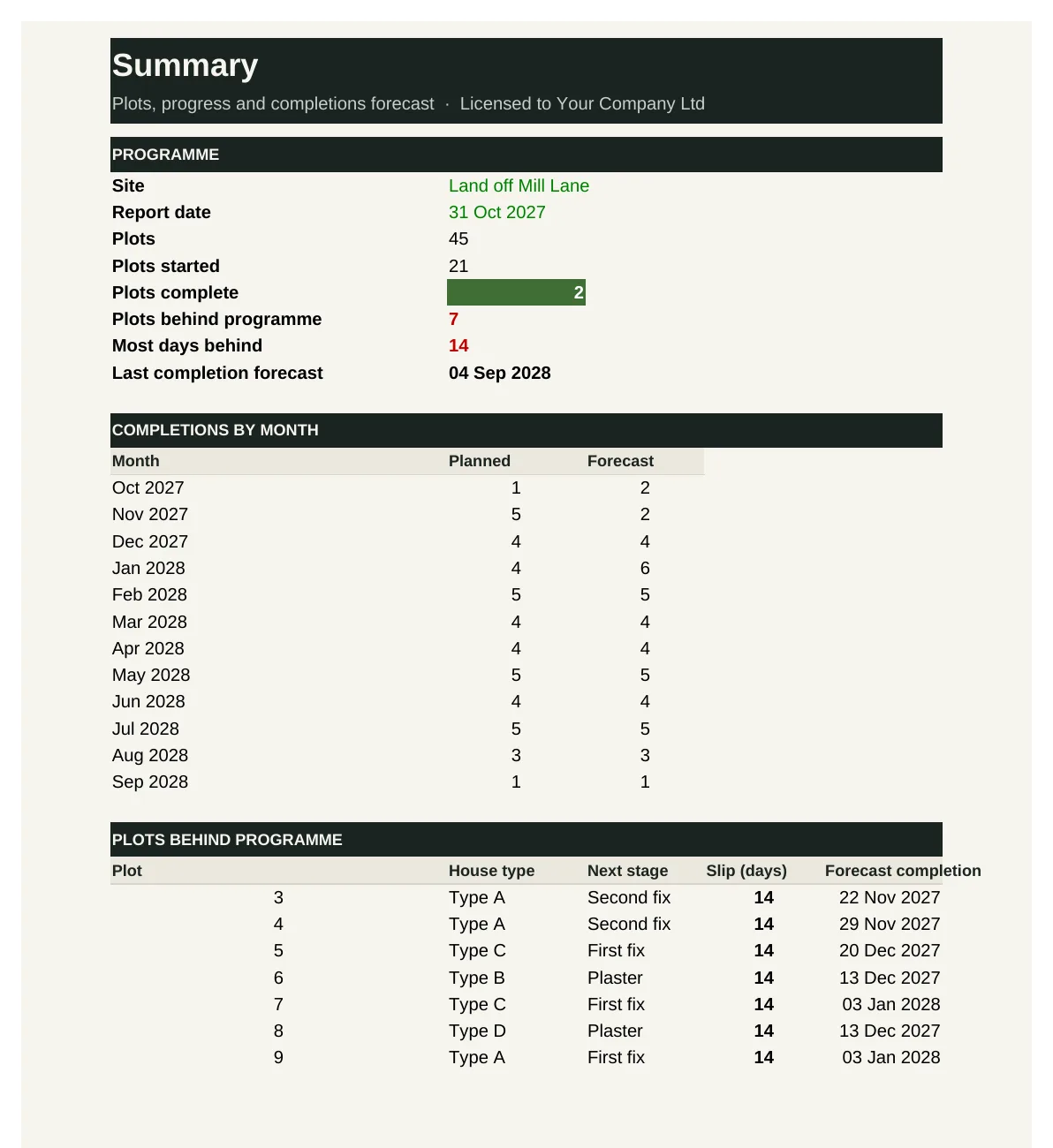
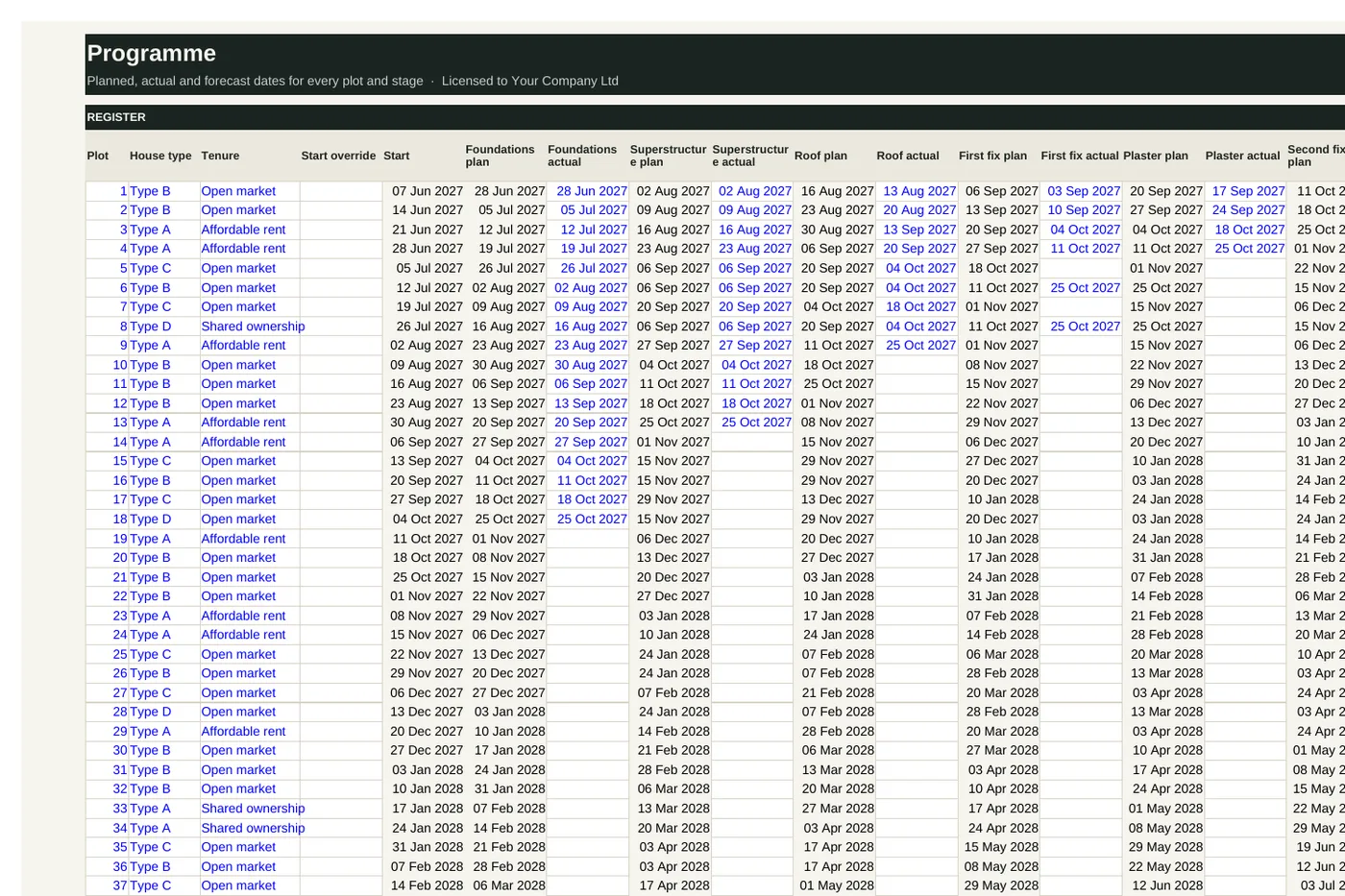
BD-01 sets out every plot's build from start to completion across seven stages. It plans each stage from the plot start and the stage durations for its house type, records actual finish dates, carries any slip forward to forecast completion, and shows plots behind, a two-week look-ahead and completions by month.
Who it's for: Construction and project managers planning and running a site, and anyone who needs reliable plot dates.
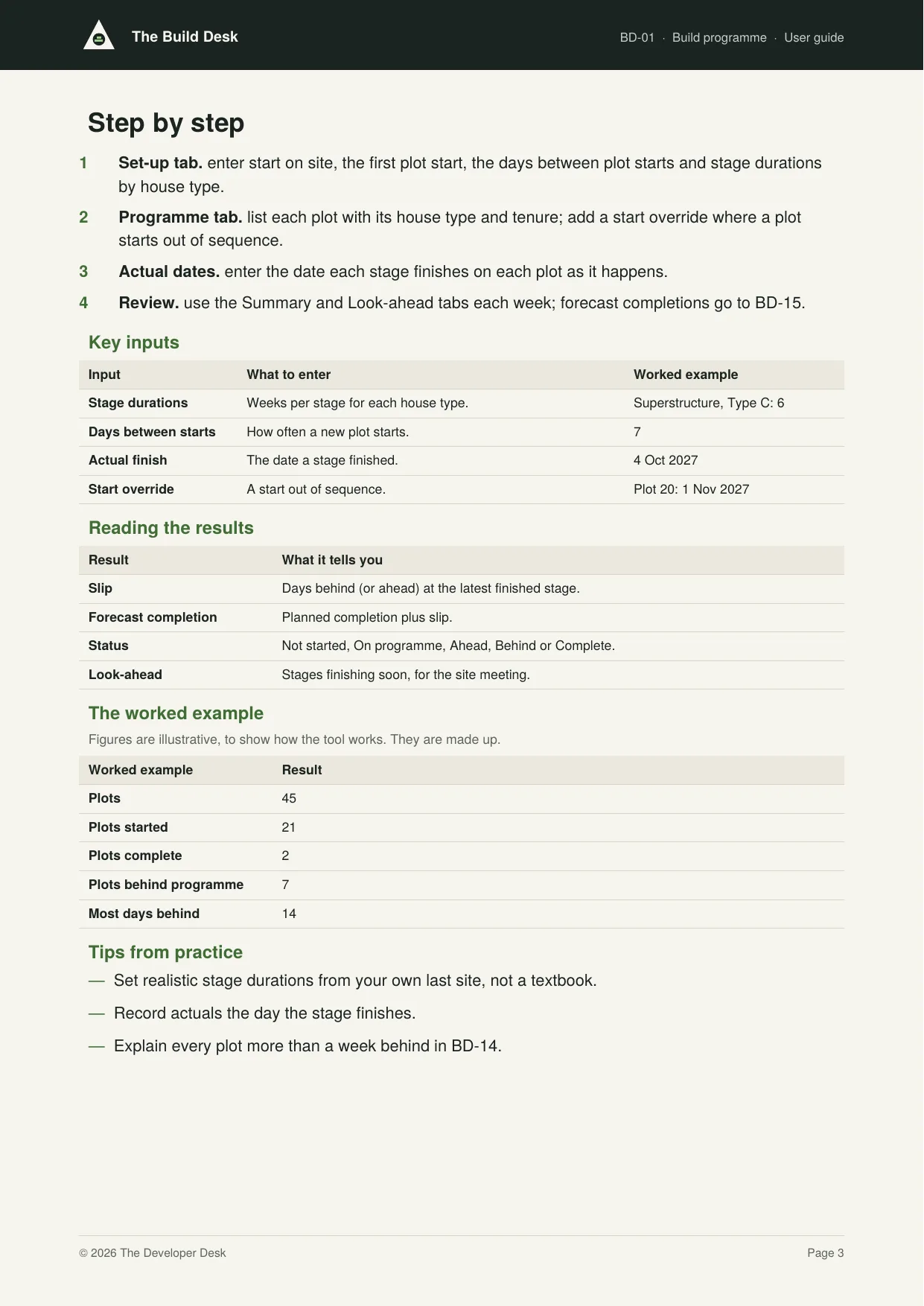
You enter: Stage durations, Days between starts, Actual finish, Start override.
You get: Slip, Forecast completion, Status, Look-ahead.
Tabs: Summary · Set-up · Programme · Look-ahead
Site set-up and mobilisation checklist
Hoarding, welfare, compound, services and signage ready before the first plot.
BD-02 lists everything that must be in place before the first plot starts: hoarding and security, welfare, compound, temporary services, signage, notifications, access and health and safety. It shows readiness overall and by category, lists the blockers, and gives a ready-to-start sign-off.
Who it's for: Site and construction managers mobilising a new site, and the director who signs it off.
You enter: Essential, Status, Evidence, Due.
You get: Readiness, Blocker, Overdue, Sign-off.
Tabs: Summary · Checklist · Sign-off
Construction phase plan
The CDM plan for the site, with duty holders, risks and arrangements.
BD-03 holds the project details, duty holders, site rules, welfare and emergency arrangements and the significant risks, and assembles them into a construction phase plan ready to issue. It checks the plan against the content the regulations expect and keeps a review log.
Who it's for: Principal contractors, construction managers and site managers on sites under the CDM Regulations.
You enter: Duty holders, Arrangements, Risk, RAMS ref.
You get: Complete, Missing, No RAMS ref, Plan.
Tabs: Summary · Details · Arrangements · Risks · Review log · Plan
Plot sequencing and resource planner
Plot order, gangs and trades levelled across the programme.
BD-04 sets out the order and week each plot starts, when each trade works on a plot, and the gangs available. It builds a week-by-week histogram of plots needing each trade and flags any week where demand exceeds the gangs, so you can add a gang or re-sequence before it bites.
Who it's for: Construction managers sequencing plots and booking subcontract gangs.
You enter: Starts, Weeks per plot, Gangs, Start week.
You get: Demand, Short, Peak demand, Weeks short.
Tabs: Summary · Resources · Sequence · Histogram
Run the site bundle
Record the day and keep the materials coming.Daily site diary
Weather, labour, deliveries, visitors and instructions, every working day.
BD-05 is the daily site diary: weather and time lost, labour by trade, plant, deliveries, visitors, instructions received and the day's events. It totals labour and lost time by week and lists the days time was lost, the evidence you need for delay claims and extensions of time.
Who it's for: Site managers keeping the site diary, and construction managers reviewing it.
You enter: Weather, Hours lost, Labour, Instructions.
You get: Total on site, Operative days, Hours lost, Days with time lost.
Tabs: Summary · Diary
Labour and subcontractor attendance
Who was on site and for how long, against what the programme needed.
BD-06 compares the labour each subcontractor promised with the labour that turned up, week by week. It flags under-resourcing below your threshold and any gang not fully inducted or card-checked, and totals attendance by trade.
Who it's for: Site and construction managers holding subcontractors to their resourcing commitments.
You enter: Planned, Actual, All inducted, Cards checked.
You get: Variance, Attendance, Under-resourced, Check compliance.
Tabs: Summary · Attendance
Materials call-off and deliveries
Call-offs by plot and stage, delivery slots and shortfalls.
BD-07 lists every call-off with the date it is needed, the supplier's lead time and the date it must be called off. It shows what to call off now, what is overdue and what is late arriving, so the gangs never stand waiting for materials.
Who it's for: Site managers and buyers calling off materials against the programme.
You enter: Needed on site, Lead time, Called off, Delivered.
You get: Call off by, Call off now, Call off overdue, Late delivery.
Tabs: Summary · Call-offs
Plant and equipment register
Hired and owned plant, inspections, off-hire dates and cost.
BD-08 lists every item of plant on hire with its weekly rate, cost to date and inspection dates. It flags overdue inspections and plant due or overdue off hire, and totals weekly cost by supplier, so nothing sits on hire unused or uninspected.
Who it's for: Site managers and quantity surveyors controlling plant hire on site.
You enter: On hire, Weekly rate, Last inspected, Inspect every.
You get: Cost to date, Next inspection, Inspection overdue, Off hire due.
Tabs: Summary · Register
Quality and safety bundle
Build it right and keep everyone safe.Stage inspection checklists
Foundations, DPC, first fix, pre-plaster and final, signed off plot by plot.
BD-09 records the internal quality inspection of each plot at foundations, superstructure, first fix, pre-plaster and final. It logs every defect against the trade responsible until it is closed, and shows the first-time pass rate, open and overdue defects, and trades with repeat defects.
Who it's for: Site and construction managers running internal quality inspections.
You enter: Result, Defects raised, Trade, Target.
You get: First-time pass rate, Re-inspect, Overdue, Repeat.
Tabs: Summary · Inspections · Defects
Health and safety inspection log
Weekly site inspections, actions raised and close-out.
BD-10 logs each site safety inspection with its score and every finding as an action with a category, severity, owner and target date. It shows the latest and average score, open and overdue actions, high-severity findings still open, and findings by category to spot repeat problems.
Who it's for: Site managers and health and safety advisers inspecting the site and following up findings.
You enter: Score, Severity, Owner, Target.
You get: Latest score, Overdue, High-severity open, By category.
Tabs: Summary · Inspections · Actions
RAMS and permits register
Method statements, permits to dig, work at height and hot works.
BD-11 tracks every risk assessment and method statement from receipt to approval and review, and every permit to work from issue to close. It flags RAMS missing, awaiting approval or past review, and permits that have expired without being closed.
Who it's for: Site and construction managers controlling subcontractor RAMS and permits to work.
You enter: Received, Approved, Review by, Expires.
You get: Missing, Awaiting approval, Review overdue, Expired, not closed.
Tabs: Summary · RAMS · Permits
Warranty inspection readiness
Each warranty stage booked, passed and recorded before it holds up a plot.
BD-12 lists the warranty inspections for each plot (foundations, pre-plaster and pre-handover) with the date the plot is ready. It shows which to book now, which are late or not booked, and failures awaiting re-inspection, so a missed inspection never holds up a completion.
Who it's for: Site managers booking warranty inspections and construction managers watching for failures.
You enter: Ready for inspection, Booked on, Result, Re-inspected.
You get: Book now, Not booked: late, Failed: re-inspect, Passed.
Tabs: Summary · Inspections
Progress and reporting bundle
Show where every plot is, and when it will finish.Build stage tracker
Every plot's stage and value of work done, ready for valuations.
BD-13 records the stage each plot has reached at each valuation and turns it into value earned, using the house build value per plot and the cumulative value at each stage. It totals value earned, the movement since the last valuation, and progress by stage and house type, ready for CM-08.
Who it's for: Construction managers and quantity surveyors valuing progress on house build.
You enter: Value per plot, Cumulative %, Stage at last valuation, Stage now.
You get: Value now, Movement, Complete, Plots by stage.
Tabs: Summary · Set-up · Tracker
Delay and early warning log
Causes, effects and recovery actions, before they reach completions.
BD-14 logs every delay and early warning with its cause, the plots affected, days lost, owner and mitigation. It totals days lost by cause, shows what is open and for how long, and marks what can be recovered from others.
Who it's for: Construction and site managers managing programme risk, and commercial teams recovering costs.
You enter: Type, Cause, Days lost, Recoverable.
You get: Days lost, Days open, Open past the limit, Recoverable.
Tabs: Summary · Log
Completion forecast
Plot completion dates, passed to sales and customer care.
BD-15 takes each plot's programme forecast from BD-01, lets you override it with a reason, records actual completions and compares the result with last month's forecast. It shows completions by month, plots that have moved later and forecasts with low confidence.
Who it's for: Construction managers, sales teams, finance and the customer desk, who all depend on completion dates.
You enter: Programme forecast, Override, Reason, Last month's forecast.
You get: Forecast completion, Change, By month, Reason needed.
Tabs: Summary · Forecast
Construction dashboard
Progress, quality and safety across every site on one page.
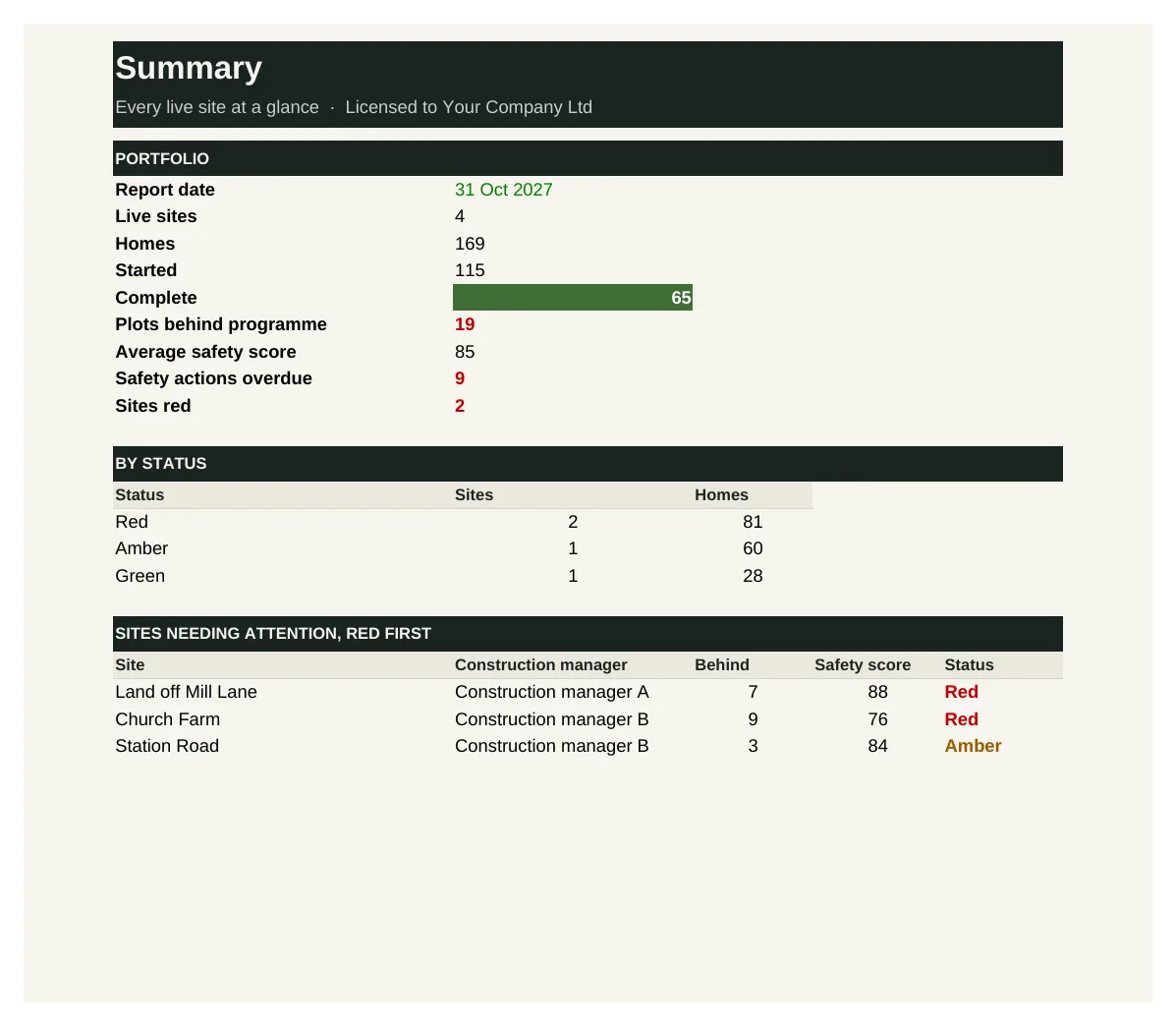
BD-16 brings each live site's key measures together from its Build Desk tools: progress, plots behind, value earned, safety score, quality, overdue actions, RAMS and last completion. It rates each site red, amber or green against thresholds you set and lists the sites needing attention, red first.
Who it's for: Construction and managing directors overseeing several live sites.
You enter: Behind, Safety score, First-time pass, RAMS in place.
You get: Behind %, Status, Sites red, By status.
Tabs: Summary · Sites
See inside
Real screens from the workbooks
Taken straight from the tools with the worked example filled in, so you can see exactly what you get before you buy.
In every tool
How it works
1 — Download
Buy a single tool, a bundle or the full desk. Each one is licensed to your company and sent by email.
2 — Set up once
Enter your house types, build stages and trade durations using the user guide.
3 — Build and report
Run every site to the same programme, and take one progress report to your board each month.
Pricing
Buy what you need, or get everything
Single tool
£95–£295
One workbook with its user guide and worked example.
Start here
Bundle of four
£295–£595
Four tools that work together. The plan and mobilise bundle is the place to start.
Full Build Desk
£1,495
All 16 tools and guides, yours to keep, with 12 months of updates and the monthly Q&A call. Then £395 a year to keep updating.
The Full Desk
£5,950
All six desks and all 96 tools, yours to keep, with 12 months of updates and the monthly Q&A call. Then £1,190 a year to keep updating.
Founding members: £4,450, with updates at £890 a year for life, for the first 50.
Set-up service
Your figures loaded for you · from £1,500
We load the tools with your own costs, rates, values, house types and approval rules, so they're ready to use from day one.
Prices exclude VAT. Single tools, bundles and desks are for one user and yours to keep. See pricing for every desk
Written by people who have done the job
The Build Desk is built by the same professionals as The Land Desk, working with construction and site managers who have set up sites, run build programmes and handed homes over to buyers and registered providers.
Every tool is built from that experience: the records and controls a well-run site relies on, in a form you can pick up and use the same week.
Become a founding member
The first 50 founding members get The Full Desk, all six desks and 96 tools, for £4,450 instead of £5,950, with updates at £890 a year fixed for life.