For SME developers and their partners
From reservation to the end of warranty.
Sixteen ready-to-use tools for looking after buyers before, during and after they move in, built by professionals who have handed over homes and closed out defects. Excel workbooks with a worked example and a user guide for every one.
Built for the people who look after the buyers
SME housebuilders
Look after buyers the way the best national builders do, without a customer care department.
Small registered providers
Track defects on homes you take from developers, right through to the end of the defects period.
Customer care and sales teams
One record for every buyer, from reservation to the end of warranty.
The toolkit
Sixteen tools, from reservation to warranty
Every tool is a ready-to-use Excel workbook with a filled-in worked example and a PDF user guide. Buy one tool, a bundle of four or the full desk.
Reservation to exchange bundle
Keep every buyer informed while their home is built.Reservation and pre-contract pack
Reservation agreement, key information and buyer checklist.
CU-01 holds the plot, price and buyer details and produces a reservation agreement and a key information sheet from them. It works out when the reservation expires and checks every document has been issued, flagging anything needed before reserving that is missing.
Who it's for: Sales advisers taking reservations and customer care teams checking the pack is complete.
You enter: Price, Reservation fee, Reservation period, Issued.
You get: Reservation expires, Missing, Agreement, Key information.
Tabs: Summary · Plot · Agreement · Key information · Checklist
Buyer journey tracker
Every buyer from reservation to completion, with each contact recorded.
CU-02 keeps one record for each buyer and a log of every contact and promise. It works out when each buyer is next due a contact, more often as completion gets close, and lists contacts due this week and overdue.
Who it's for: Customer care and sales teams looking after buyers between reservation and completion.
You enter: Stage, Prefers, Contact, Promise.
You get: Last contact, Next contact due, Overdue, Promises open.
Tabs: Summary · Buyers · Contacts
Choices and extras manager
Options, prices and cut-off dates tied to build stage.
CU-03 lists the choices and extras on offer with prices, costs and the build stage each must be chosen by. It takes each plot's stage dates from the programme to set cut-off dates, records each buyer's selections, flags late selections and lists buyers to remind before their next cut-off.
Who it's for: Sales and customer care teams managing buyer choices and paid extras, and the site team who build them.
You enter: Price and cost, Cut-off stage, Stage dates, Ordered.
You get: Cut-off date, Late, Extras revenue, Remind now.
Tabs: Summary · Options · Cut-offs · Selections
Build update planner
Scheduled buyer updates linked to the build programme.
CU-04 sets update points at each build stage, from the welcome to the home demonstration, with template wording. It schedules each buyer's updates from their plot's programme dates, fills in the wording, and lists updates due this week and overdue.
Who it's for: Customer care teams keeping buyers updated as their home is built.
You enter: Measured from, Days after, Stage date, Sent.
You get: Due, Wording, Overdue, To send.
Tabs: Summary · Stages · Schedule · Templates
Handover bundle
Hand over a finished home, first time.Pre-handover quality inspection
Room-by-room checks before the buyer ever sees the home.
CU-05 is a room-by-room inspection of each home before the buyer sees it. It logs every defect against the trade responsible, tracks it to close-out, shows which plots are ready for handover and which are at risk, and spots repeat defects by trade.
Who it's for: Customer care and site managers inspecting homes before handover.
You enter: Pass or fail, Defect, Trade, Handover.
You get: Defects per plot, Ready, At risk, Repeat.
Tabs: Summary · Checklist · Defects · Plots
Home demonstration and user guide
Demonstration script, meter readings and a home guide for each plot.
CU-06 holds everything plot-specific (systems, locations, appliances, warranty, contacts and meter readings) and builds the home user guide from it. Its demonstration script makes sure every buyer is shown the same things, and the Summary shows what's still to show or fill in.
Who it's for: Customer care and site managers handing over new homes.
You enter: Locations, Heating, Meter readings, Shown.
You get: Demonstration complete, Details still to fill in, Guide, Meter readings.
Tabs: Summary · Plot · Demonstration
Completion and keys checklist
Legal completion, key release and move-in sign-off.
CU-07 records what is handed over on each plot: legal completion confirmed, keys and fobs, meter readings, warranty certificate, user guide, demonstration and the buyer's signature. It checks each record is complete, flags gaps and plots due in the next week that aren't ready, and prints a signed handover record.
Who it's for: Customer care and sales teams handing over homes on completion day.
You enter: Legal completion, Keys, Items, Buyer signed.
You get: Done of 7, Handed over: gaps, Due: not ready, Handover record.
Tabs: Summary · Checklist · Handover record
Visit and appointment planner
Booking letters, access arrangements and missed-visit follow-up.
CU-08 records every visit to a buyer's home: the defect it's for, the trade, when it was requested and booked, access arrangements and the outcome. It produces a diary of visits ahead and a confirmation letter, and lists visits to book and missed visits to follow up.
Who it's for: Customer care teams booking trades into buyers' homes.
You enter: Trade, Booked for, Slot, Outcome.
You get: Diary, Missed: follow up, Book now: late, Letter.
Tabs: Summary · Visits · Diary · Letters
Aftercare bundle
Fix it fast and keep the record.Customer care request log
Every call, email and visit in one place, with response time targets.
CU-09 logs every request about a home with its channel, category and urgency, and measures the time to acknowledge and resolve it against your targets. It shows open requests, response times by category, and requests open past target.
Who it's for: Customer care teams handling calls, emails and visits from homeowners after completion.
You enter: Urgency, Category, Acknowledged, Resolved.
You get: Ack. in target, Resolved in target, Days open, Overdue.
Tabs: Summary · Requests · Targets
Defect and snagging tracker
Room by room, trade assigned, photos referenced and signed off when closed.
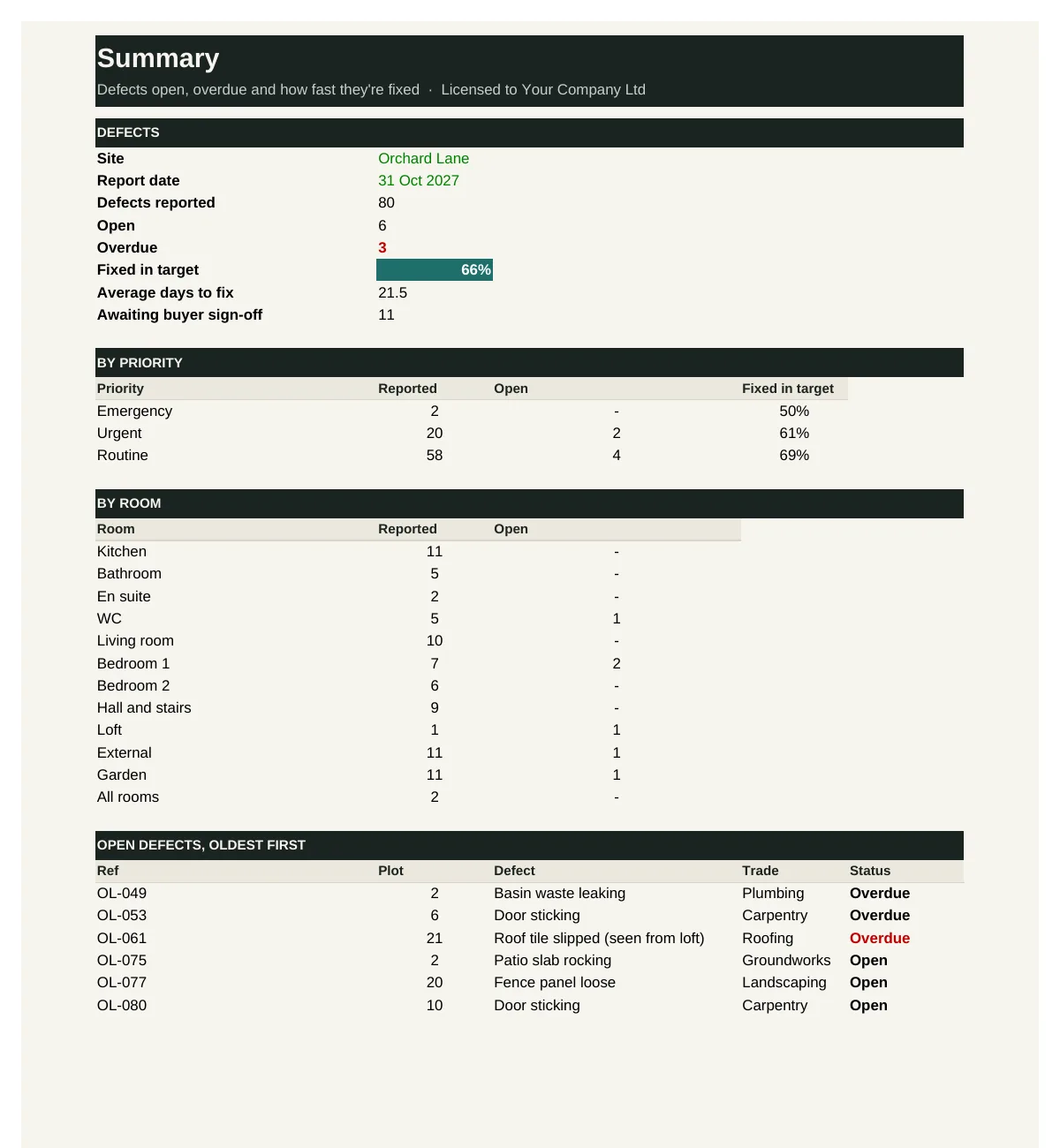
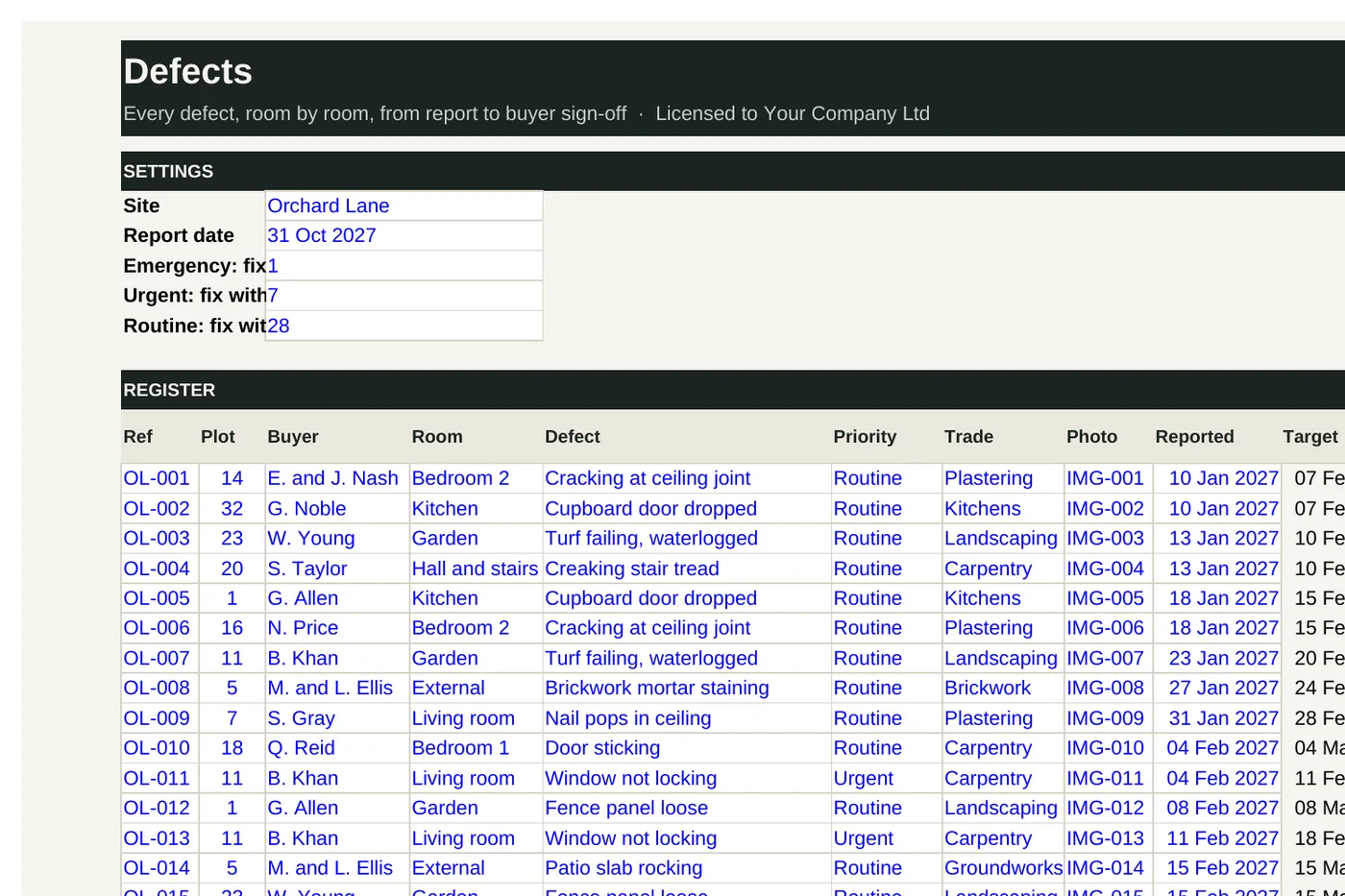
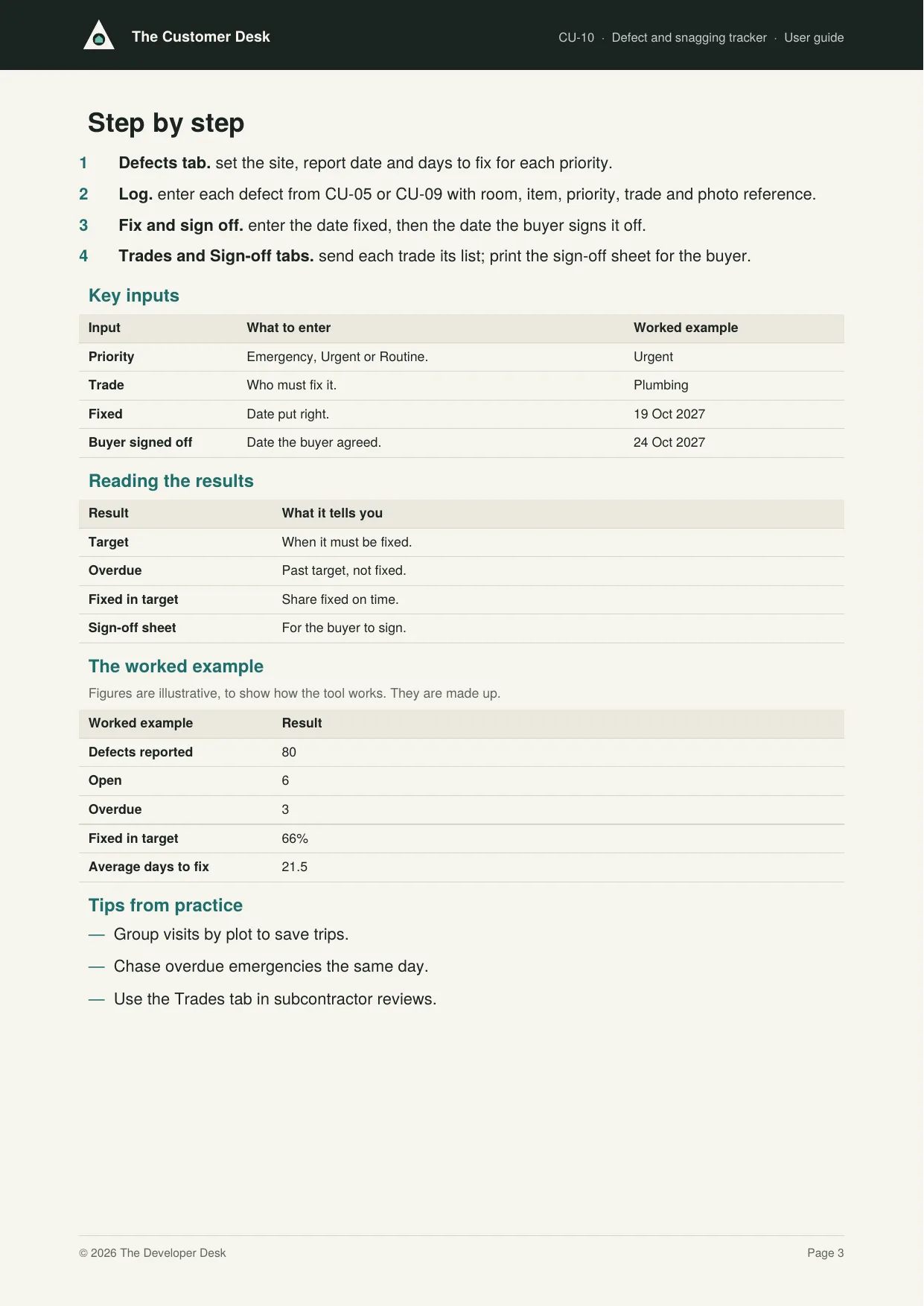
CU-10 is the defect tracker: every defect by plot, room and item with its priority, trade, photo, target and fixed dates and the buyer's sign-off. It shows open and overdue defects, the share fixed in target, average days to fix by trade and priority, a work list for each trade and a sign-off sheet for each buyer.
Who it's for: Customer care teams managing defects after completion, and the trades who fix them.
You enter: Priority, Trade, Fixed, Buyer signed off.
You get: Target, Overdue, Fixed in target, Sign-off sheet.
Tabs: Summary · Defects · Trades · Sign-off
Trade recall and back-charge
Instruct subcontractors back, chase attendance and record back-charges.
CU-11 records each recall issued to a subcontractor, the date they must attend, whether they attended and put it right, and any back-charge. It shows recalls outstanding and overdue, attendance in time and back-charges by subcontractor, and produces a recall notice.
Who it's for: Customer care and commercial teams managing subcontractors' defect obligations after completion.
You enter: Attend by, Attended, Put right, Back-charge.
You get: Status, Attended in time, Back-charges, Notice.
Tabs: Summary · Recalls · Notice
Complaints and escalation file
Complaints timeline, evidence pack and response letters.
CU-12 tracks each formal complaint against its deadlines to acknowledge, update and give a final response, flags anything late and rates the risk of escalation to the New Homes Ombudsman. It keeps a timeline of every step, an index of evidence and an acknowledgement letter.
Who it's for: Customer care managers handling formal complaints from homeowners.
You enter: Received, Acknowledged, Final response, Evidence refs.
You get: Days open, Check, Escalation risk, Letter.
Tabs: Summary · Complaints · Plots · Timeline · Letters
Standards and reporting bundle
Meet the code and prove it to your board.Warranty period diary
Builder warranty milestones and end-of-warranty checks for each plot.
CU-13 works out each plot's builder warranty and structural cover end dates from completion, schedules the one-year and end-of-warranty checks, and shows what is due and overdue, with a month-by-month diary.
Who it's for: Customer care teams managing homes through the builder warranty period.
You enter: Completed, Builder warranty, Check done, Lead.
You get: Warranty ends, Check due, Next action, Diary.
Tabs: Summary · Plots · Diary
New Homes Quality Code checklist
A self-check against the code at each stage of the sale.
CU-14 is a self-check against the New Homes Quality Code, from fair treatment and marketing through reservation, contract and completion to after-sales. It records the evidence and status of each requirement, shows compliance by stage and lists the actions to close each gap.
Who it's for: Sales, customer care and compliance leads at developers registered with the New Homes Quality Code.
You enter: Status, Evidence, Action, Due.
You get: Compliance, By stage, No action, Overdue.
Tabs: Summary · Requirements
Buyer satisfaction tracker
Survey results, reviews and recommend scores by site.
CU-15 records survey results at 8 weeks and 9 months, whether buyers would recommend you, and review ratings, site by site. It works out average scores, the recommend rate and an indicative star rating, and lists low scores not yet followed up.
Who it's for: Customer care and managing directors tracking buyer satisfaction and reviews.
You enter: Survey, Score, Would recommend, Followed up.
You get: Recommend rate, Star rating, By site, Low scores.
Tabs: Summary · Surveys
Customer care dashboard
Open cases and response times across every site on one page.
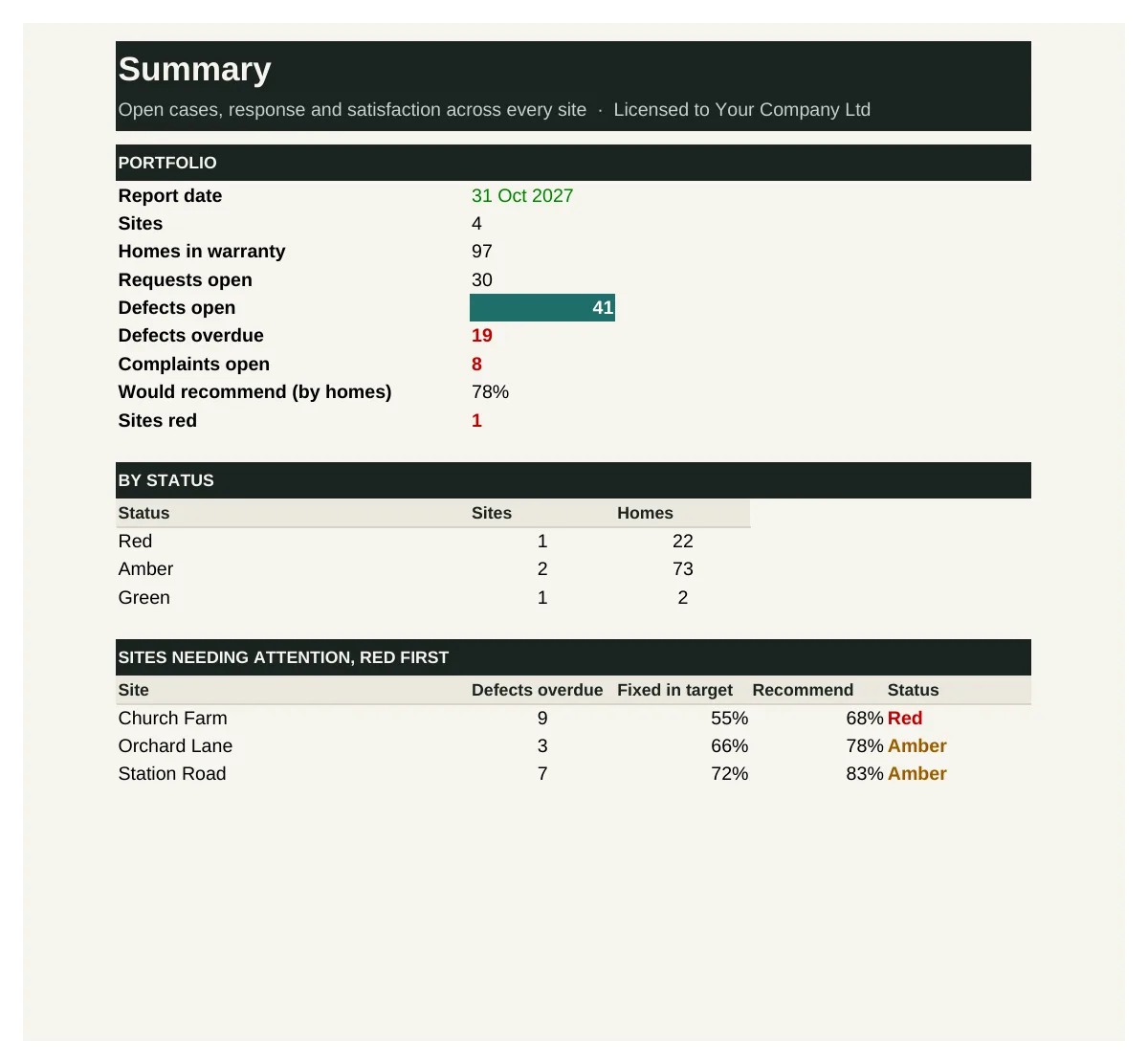
CU-16 brings each site's customer care measures together: homes in warranty, open requests and defects, overdue defects, fixed in target, days to fix, complaints and satisfaction. It rates each site red, amber or green and lists the sites needing attention.
Who it's for: Customer care and managing directors overseeing aftercare across several sites.
You enter: Defects open, Fixed in target, Complaints open, Would recommend.
You get: Open defects per home, Status, Would recommend, Sites red.
Tabs: Summary · Sites
See inside
Real screens from the workbooks
Taken straight from the tools with the worked example filled in, so you can see exactly what you get before you buy.
In every tool
How it works
1 — Download
Buy a single tool, a bundle or the full desk. Each one is licensed to your company and sent by email.
2 — Set up once
Enter your sites, trades and response targets using the user guide.
3 — Hand over and report
Treat every buyer the same way, and take one customer report to your board each month.
Pricing
Buy what you need, or get everything
Single tool
£95–£295
One workbook with its user guide and worked example.
Start here
Bundle of four
£295–£595
Four tools that work together. The aftercare bundle is the place to start.
Full Customer Desk
£1,495
All 16 tools and guides, yours to keep, with 12 months of updates and the monthly Q&A call. Then £395 a year to keep updating.
The Full Desk
£5,950
All six desks and all 96 tools, yours to keep, with 12 months of updates and the monthly Q&A call. Then £1,190 a year to keep updating.
Founding members: £4,450, with updates at £890 a year for life, for the first 50.
Set-up service
Your figures loaded for you · from £1,500
We load the tools with your own costs, rates, values, house types and approval rules, so they're ready to use from day one.
Prices exclude VAT. Single tools, bundles and desks are for one user and yours to keep. See pricing for every desk
Written by people who have done the job
The Customer Desk is built by the same professionals as The Land Desk, working with customer care managers who have handed over homes, run defect periods and answered to buyers and registered providers.
Every tool is built from that experience: the records and standards a well-run customer team relies on, in a form you can pick up and use the same week.
Become a founding member
The first 50 founding members get The Full Desk, all six desks and 96 tools, for £4,450 instead of £5,950, with updates at £890 a year fixed for life.