For SME developers and their partners
From price list to completion.
Sixteen ready-to-use tools for pricing, launching, selling and forecasting new homes, built by professionals who have priced sites and reported sales to boards and funders. Excel workbooks with a worked example and a user guide for every one.
Built for the people who price and sell the homes
SME housebuilders
Price and release plots properly, hold your values and hit the sales rate your appraisal assumed.
Small registered providers
Run shared ownership and open market sales with the same discipline as a national builder.
Agents and sales teams
Report to every client the same way, from first enquiry to legal completion.
The toolkit
Sixteen tools, from launch to the last completion
Every tool is a ready-to-use Excel workbook with a filled-in worked example and a PDF user guide. Buy one tool, a bundle of four or the full desk.
Pricing bundle
Set the prices and release the plots.Market and competitor tracker
Competing sites, asking prices, incentives and sales rates near your scheme.
SD-01 keeps a record of the competing new-build sites around your scheme: products, sizes, asking prices, incentives and sales rates. It works out net price and net £ per sq ft and sets your own prices against the market, product by product.
Who it's for: Sales and marketing managers pricing a scheme and watching the competition.
You enter: Asking price, Incentive value, Size, Sales a month.
You get: Net price, Net £ per sq ft, Ours vs market, Re-check.
Tabs: Summary · Our scheme · Competitors
Price list and plot premiums
Base prices by house type, then premiums for aspect, garden, parking and position.
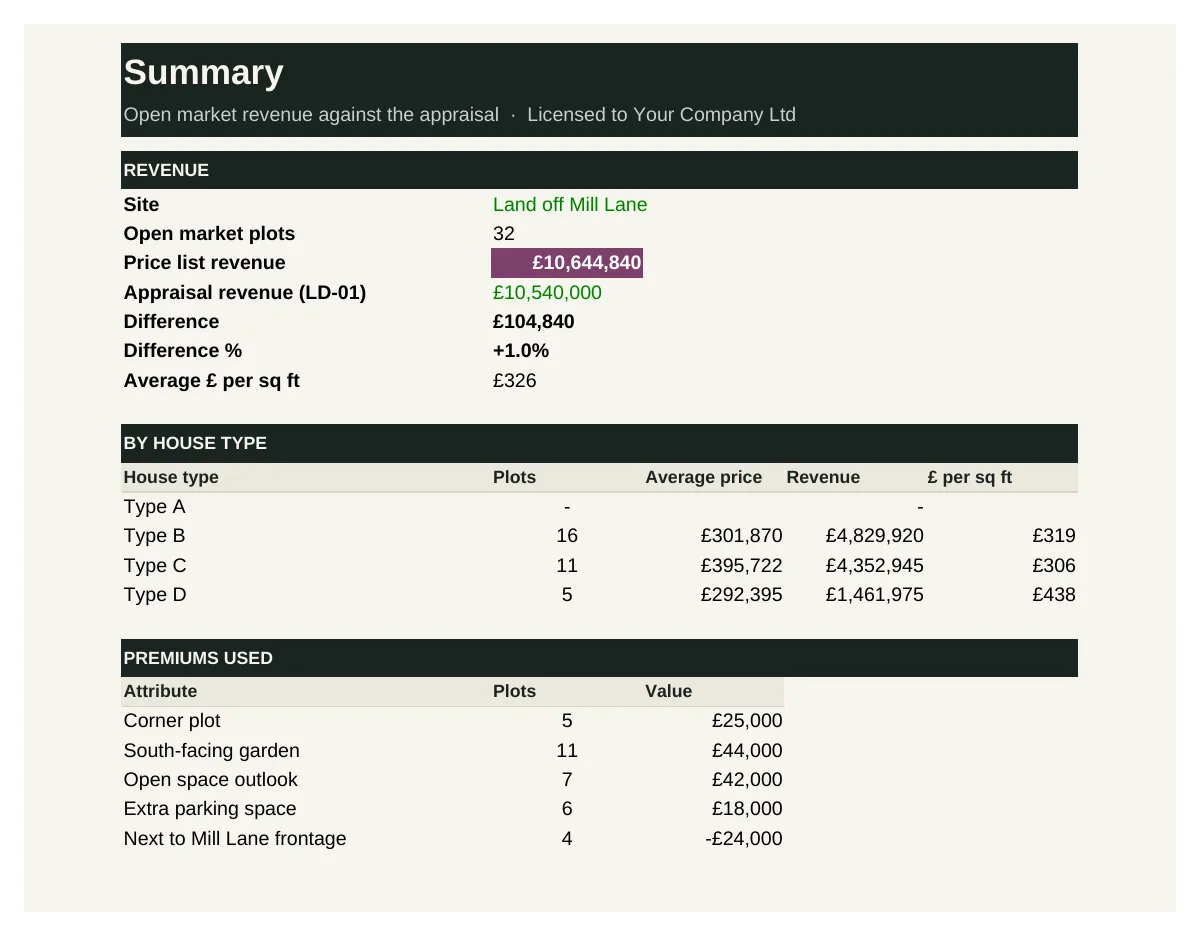
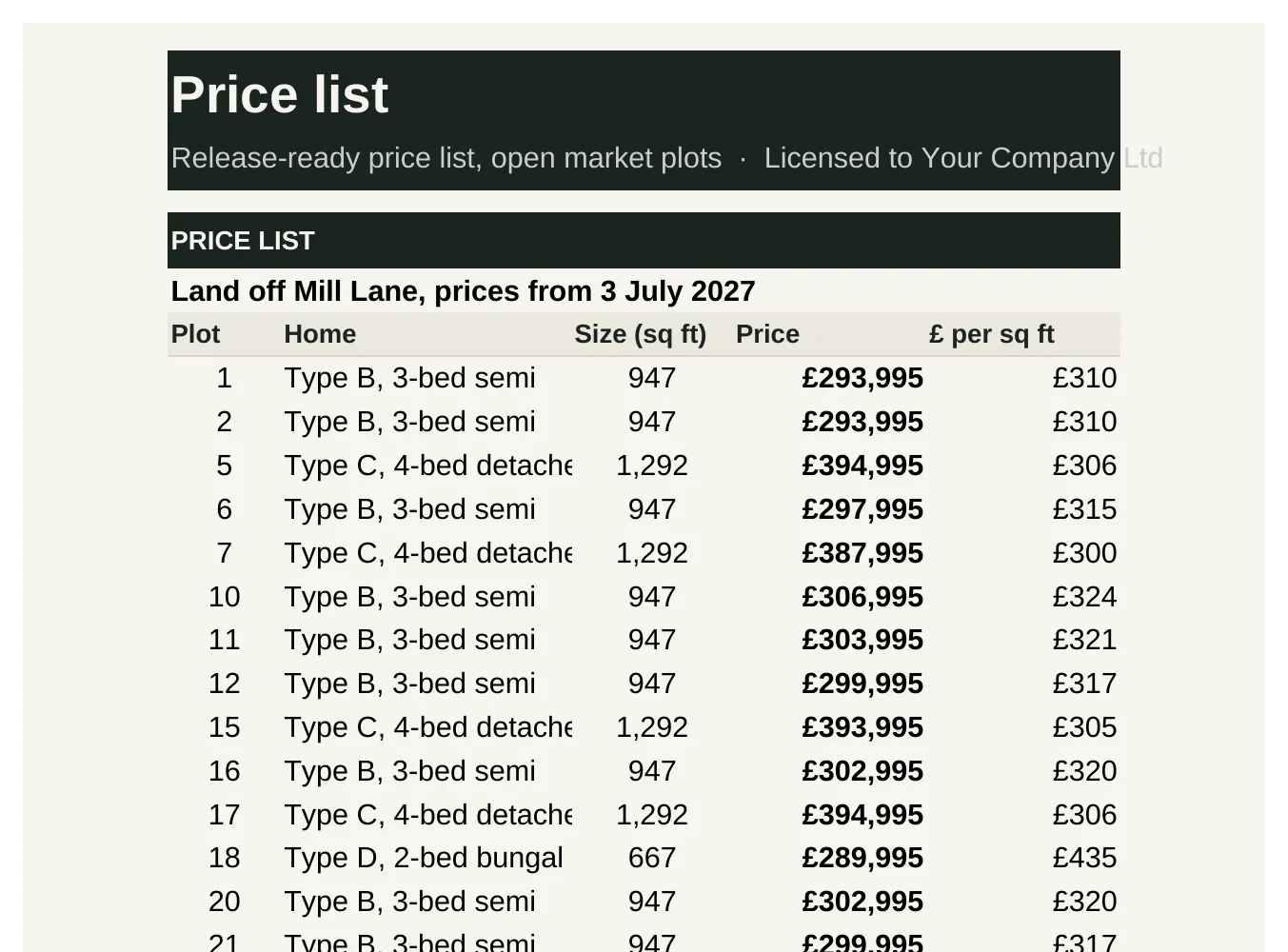
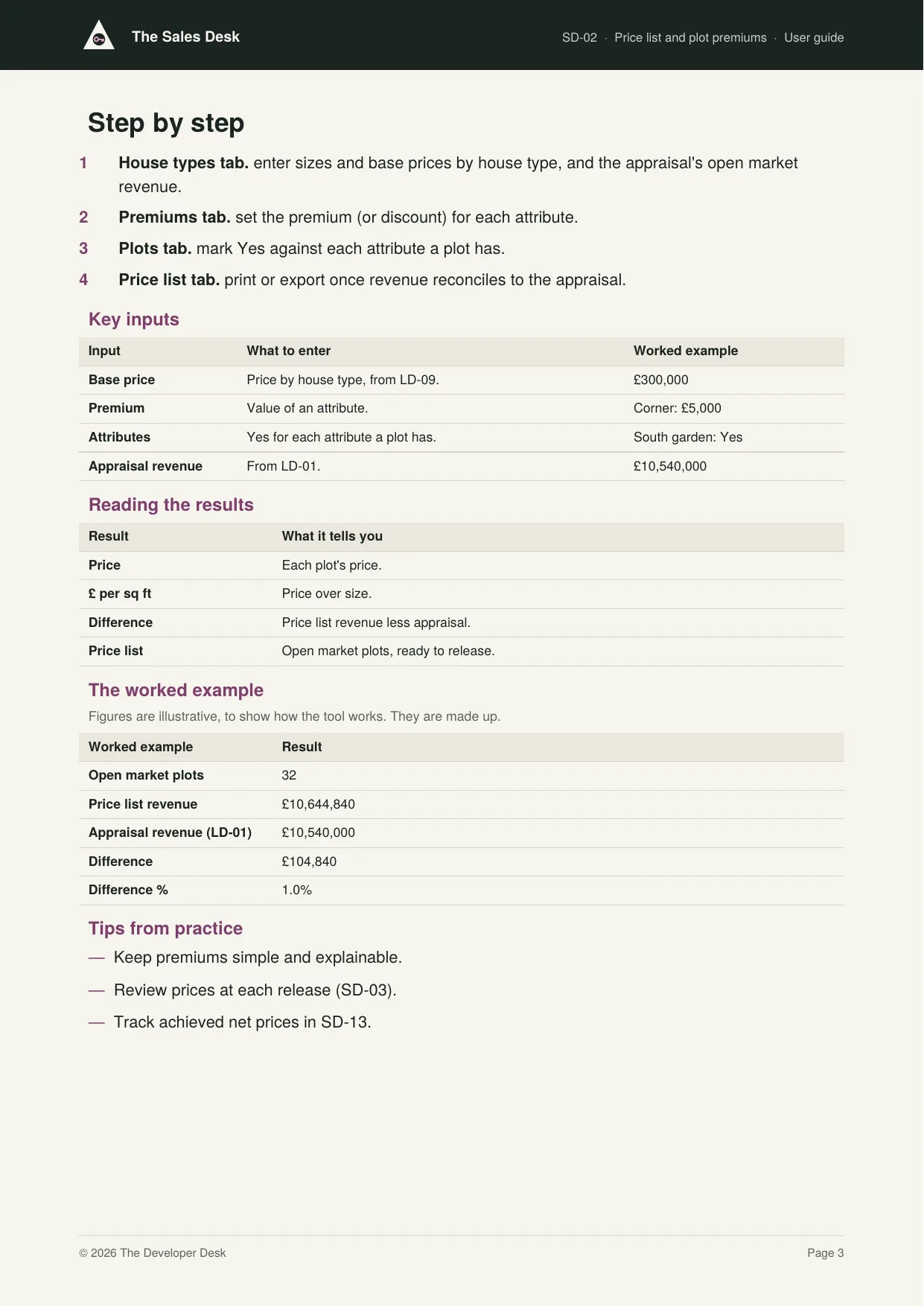
SD-02 sets a base price for each house type, then adds a premium or discount for each plot's attributes: corner, south-facing garden, outlook, extra parking, or a less favoured position. It gives a price and £ per sq ft for every open market plot, a release-ready price list and a reconciliation to the appraisal.
Who it's for: Sales directors and managers setting the price list for a new scheme or release.
You enter: Base price, Premium, Attributes, Appraisal revenue.
You get: Price, £ per sq ft, Difference, Price list.
Tabs: Summary · House types · Premiums · Plots · Price list
Plot release planner
Releases plots in phases matched to build completions and sales rate.
SD-03 puts each open market plot into a release phase and shows stock available each month: plots released less plots reserved, actual to date and forecast at your target sales rate. It warns when stock falls below your minimum or rises above your maximum, and flags homes built but unsold.
Who it's for: Sales directors planning releases to match build progress and the sales rate.
You enter: Target sales a month, Minimum stock, Phase, Build completion.
You get: Available, Release more, Complete, unsold, Weeks before completion.
Tabs: Summary · Phases · Plots · Stock
Incentives and part exchange calculator
The true cost of every incentive, assisted move and part exchange against net price.
SD-04 tests the true cost of an incentive or part exchange on a plot before you agree it, showing the net price and margin after the deal. Its register records every incentive given, its cost and the net price achieved, and flags any above your cap or not approved.
Who it's for: Sales managers agreeing deals and sales directors approving incentives.
You enter: Incentives, Agreed value, Months to resell, Cap.
You get: Total cost of the deal, Net price achieved, Margin after incentives, Above the cap.
Tabs: Summary · Calculator · Register
Launch and marketing bundle
Bring buyers in and track every lead.Launch plan and marketing budget
Launch timeline, show home, signage and portal spend against a cost per sale.
SD-05 holds the launch timeline and the marketing budget for a site. It tracks committed and spent against budget by item and category, works out budget per plot and cost per sale to date, and flags late activities.
Who it's for: Sales and marketing managers planning a launch and controlling marketing spend.
You enter: Budget, Committed, Spent, Status.
You get: Remaining, Budget per plot, Cost per sale, Late.
Tabs: Summary · Budget · Timeline
Lead and enquiry tracker
Every enquiry by source, with follow-ups and conversion to reservation.
SD-06 records every enquiry with its source, buyer type, budget and needs, and follows it through contact, viewing and reservation. It shows conversion by source and lists follow-ups due and overdue, so no buyer goes cold.
Who it's for: Sales advisers logging enquiries and sales managers measuring what each source delivers.
You enter: Source, Stage, Next follow-up, Plot reserved.
You get: Enquiry to reservation, By source, Overdue, Due.
Tabs: Summary · Leads
Agent and portal manager
Agent instructions, fees, portal listings and what each one delivers.
SD-07 records each estate agent, portal and paid channel with its terms and fees, and the leads and sales it produces. It works out cost to date, cost per lead and cost per sale, and flags channels above your target cost per sale.
Who it's for: Sales and marketing managers instructing agents and buying portal listings.
You enter: Monthly fee, Fee % of price, Leads, Sales.
You get: Cost to date, Cost per lead, Cost per sale, Over target.
Tabs: Summary · Channels
Show home and sales office checklist
Opening checks, presentation standards and weekly upkeep.
SD-08 lists everything that must be in place before the show home and sales office open to the public, flags blockers and gives an opening sign-off. Its issues log keeps maintenance and presentation problems in front of the owner until they're fixed.
Who it's for: Sales managers opening and running a show home and sales office, with the site team.
You enter: Essential, Status, Issue, Target.
You get: Readiness, Blocker, Overdue, Sign-off.
Tabs: Summary · Checklist · Issues · Sign-off
Sales progression bundle
Turn reservations into completions.Sales progression tracker
Reservation, mortgage offer, exchange and completion for every plot, with slippage flagged.
SD-09 follows every sale through solicitors, mortgage offer, exchange and completion. It sets an exchange target from the reservation date, flags exchanges overdue and sales at risk because build completion is close and contracts aren't exchanged, and gives a weekly chasers list.
Who it's for: Sales progressors and sales managers chasing sales from reservation to completion.
You enter: Reserved, Mortgage offer, Exchanged, Build completion.
You get: Exchange overdue, At risk, Revenue secured, Chasers.
Tabs: Summary · Sales
Mortgage and affordability checker
Tests income, deposit and lender multiples before you take a reservation.
SD-10 is a quick affordability check before you take a reservation. From the buyer's income, deposit and commitments and the lender's criteria, it works out maximum borrowing, loan needed, any shortfall, loan to value and repayments, and gives a Pass, Refer or Fail.
Who it's for: Sales advisers taking reservations and sales managers protecting against fall-throughs.
You enter: Incomes, Deposit, Commitments, Income multiple.
You get: Maximum borrowing, Shortfall, Loan to value, Result.
Tabs: Summary · Buyer · Check
Shared ownership and First Homes sales log
Eligibility, share sold, rent and discount for every affordable home ownership sale.
SD-11 logs each shared ownership and First Homes sale with the value, share or discount, price paid and rent on the unsold share. It checks each buyer against the scheme rules (income cap, first-time buyer, local connection, price cap and minimum share) and lists any that fail.
Who it's for: Sales teams selling shared ownership and First Homes, and the RPs and councils who approve buyers.
You enter: Share or discount, Household income, Local connection, Approved.
You get: Price paid, Rent a month, Eligibility check, Awaiting approval.
Tabs: Summary · Log
Bulk and investor sale pack
Prices and terms for plots sold to registered providers, PRS investors or councils.
SD-12 prices a package of homes for a registered provider, council or investor. It compares the offer with open market value, sets out payment stages and their present value, works out the margin on each plot, and produces an offer letter, subject to contract.
Who it's for: Land, sales and finance directors agreeing packages with RPs, councils and investors.
You enter: Offer price, Payment stages, Discount rate, Land and build cost.
You get: Discount to OMV, Present value, Margin, Letter.
Tabs: Summary · Plots · Terms · Letter
Forecasting and reporting bundle
Show the board and the funder where the revenue is.Sales rate against appraisal
Actual sales rate and values against what the land appraisal assumed.
SD-13 compares actual reservations and net prices with the appraisal's sales rate and prices. It shows reservations ahead or behind by month, average net price against appraisal by house type, the revenue variance on sales to date and the effect of the sales rate on finance cost.
Who it's for: Sales, land and finance directors checking a site's sales against the land appraisal.
You enter: Sales rate, Appraisal price, List price, Incentives.
You get: Actual sales a month, Ahead or behind, Revenue variance, Effect on profit.
Tabs: Summary · Appraisal · Actual · Variance
Revenue forecast
Completions and receipts by month, ready for the site cash flow.
SD-14 forecasts receipts by month from each plot's net price, sale status and completion date. It splits open market receipts into secured (exchanged) and not yet secured, adds the RP's handover payments, and gives monthly, cumulative and annual totals ready for CM-14 and LD-04.
Who it's for: Finance and sales directors forecasting receipts for the site cash flow.
You enter: Price (net), Status, Completion, RP balance.
You get: Received at completion, Secured, By month, Still to receive.
Tabs: Summary · Plots
Weekly sales report
One page of reservations, cancellations, exchanges and stock.
SD-15 turns the week's figures into a one-page report: enquiries, viewings, reservations, cancellations, exchanges, completions and stock, against last week and the site to date, with reservations against target and the week's highlights, issues and plans.
Who it's for: Sales managers reporting each week to the sales director and the board.
You enter: This week, Last week, Site to date, Comments.
You get: Change, Against target, Viewing to reservation, Report.
Tabs: Summary · Week
Sales dashboard
Revenue, sales rate and stock across every site on one page.
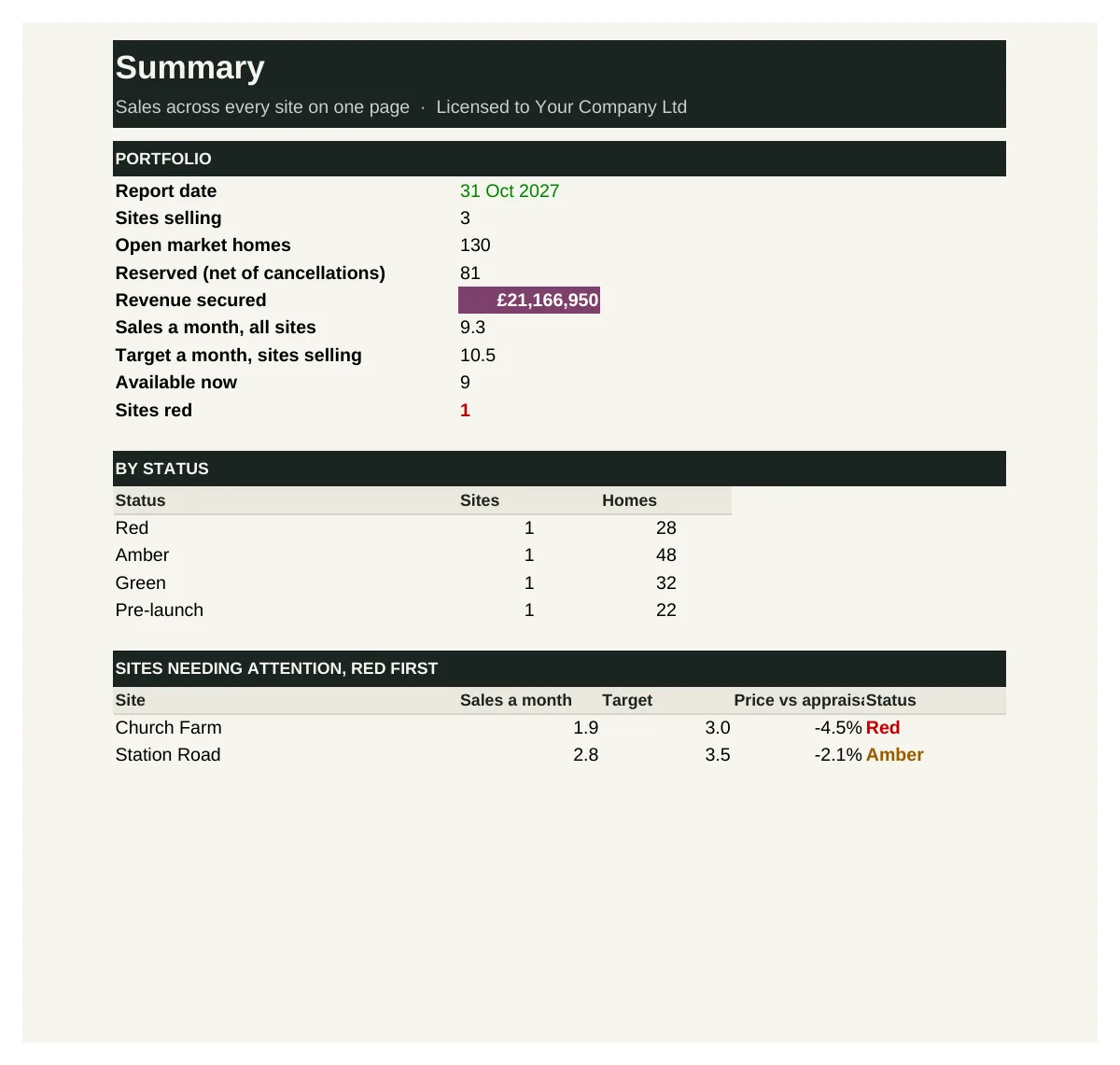
SD-16 brings each site's sales measures together: homes, reserved, exchanged, completed, stock, sales rate against target, revenue secured, net price against appraisal and cancellation rate. It rates each site red, amber or green and lists the sites needing attention.
Who it's for: Sales and managing directors overseeing sales across several sites.
You enter: Reserved, Sales a month, Net price vs appraisal, Revenue secured.
You get: Sold, Rate vs target, Status, Sites red.
Tabs: Summary · Sites
See inside
Real screens from the workbooks
Taken straight from the tools with the worked example filled in, so you can see exactly what you get before you buy.
In every tool
How it works
1 — Download
Buy a single tool, a bundle or the full desk. Each one is licensed to your company and sent by email.
2 — Set up once
Enter your house types, sizes and target values using the user guide.
3 — Price and report
Price every site the same way, and take one sales report to your board each week.
Pricing
Buy what you need, or get everything
Single tool
£95–£295
One workbook with its user guide and worked example.
Start here
Bundle of four
£295–£595
Four tools that work together. The pricing bundle is the place to start.
Full Sales Desk
£1,495
All 16 tools and guides, yours to keep, with 12 months of updates and the monthly Q&A call. Then £395 a year to keep updating.
The Full Desk
£5,950
All six desks and all 96 tools, yours to keep, with 12 months of updates and the monthly Q&A call. Then £1,190 a year to keep updating.
Founding members: £4,450, with updates at £890 a year for life, for the first 50.
Set-up service
Your figures loaded for you · from £1,500
We load the tools with your own costs, rates, values, house types and approval rules, so they're ready to use from day one.
Prices exclude VAT. Single tools, bundles and desks are for one user and yours to keep. See pricing for every desk
Written by people who have done the job
The Sales Desk is built by the same professionals as The Land Desk, working with sales directors who have priced sites, launched developments and reported revenue to boards and funders.
Every tool is built from that experience: the pricing and reporting a well-run sales team relies on, in a form you can pick up and use the same week.
Become a founding member
The first 50 founding members get The Full Desk, all six desks and 96 tools, for £4,450 instead of £5,950, with updates at £890 a year fixed for life.