For SME developers and their partners
From tender to final account.
Sixteen ready-to-use tools for tendering, cost planning, contracting and reporting, built by professionals who have run tenders and reported margin to boards and funders. Excel workbooks with a worked example and a user guide for every one.
Built for the people who buy, cost and pay for the build
SME housebuilders
Tender properly, buy well and know your margin every month, not at final account.
Small registered providers
Test package and design and build prices against real tender returns before you sign.
Quantity surveyors and partners
Give SME clients the controls of a national commercial team, set up the same way on every job.
The toolkit
Sixteen tools, from enquiry to retention release
Every tool is a ready-to-use Excel workbook with a filled-in worked example and a PDF user guide. Tendering leads the range, because poorly run tenders are where SME developers most often lose margin.
Tendering bundle
Tender properly and award with confidence.Tender package builder
Scope, specification, drawing issue list and exclusions for every trade.
CM-01 holds every trade package for a site with its scope, exclusions, drawings, specification, programme and health and safety information. It checks each package against seven tests, shows the gaps, and prints a tender pack with a cover sheet, scope schedule, exclusions schedule and drawing list.
Who it's for: Commercial managers and quantity surveyors preparing trade packages for tender, and directors who want to know which packages are ready to go out.
You enter: Type, Drawing status, Specification clauses, H&S info ready.
You get: Ready to issue, Gaps, Not for tender, Issue date passed.
Tabs: Summary · Packages · Scope · Drawings · Pack
Enquiry pack
Invitation letter, form of tender, pricing schedule and return rules.
CM-02 holds the project, dates, contract terms, tenderers, return rules and the items to price for one package. From them it writes an invitation to tender letter for each tenderer, a form of tender, and a pricing schedule locked to your item list. The Summary checks the enquiry is complete before it goes.
Who it's for: Commercial managers and quantity surveyors sending packages out to tender, who want every tenderer to receive the same documents and terms.
You enter: Form of contract, Final date for payment, Retention, Items to price.
You get: Letter, Pricing schedule, Checks, Ready to send.
Tabs: Summary · Details · Letter · Form of tender · Pricing schedule
Tender register
Who's invited, who's returned, clarifications, deadlines and chasers.
CM-03 tracks every package out to tender and every tenderer on it: invited, intends to tender, returned or declined, with the tender sum. It counts returns and days to each return date, lists the tenderers to chase, and logs clarifications until they are answered and shared with all tenderers.
Who it's for: Commercial teams running several tenders at once, and anyone who needs to know when the bids for each package will be in.
You enter: Chase window, Minimum bids, Intends to tender, Shared with all.
You get: Status, Confirm intent, Chase return, Overdue: chase now, Not shared.
Tabs: Summary · Packages · Tenderers · Clarifications
Tender comparison and levelling
Normalises bids, prices the exclusions and writes the recommendation to award.
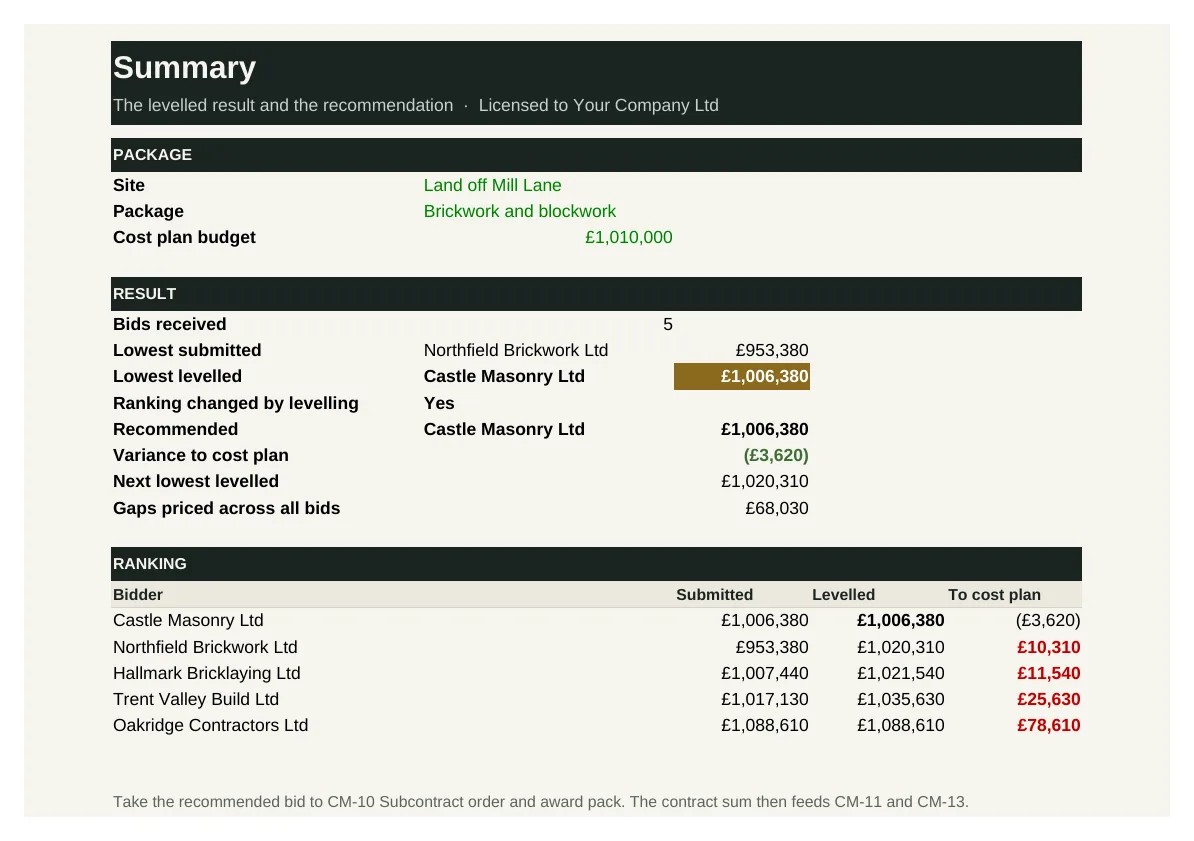
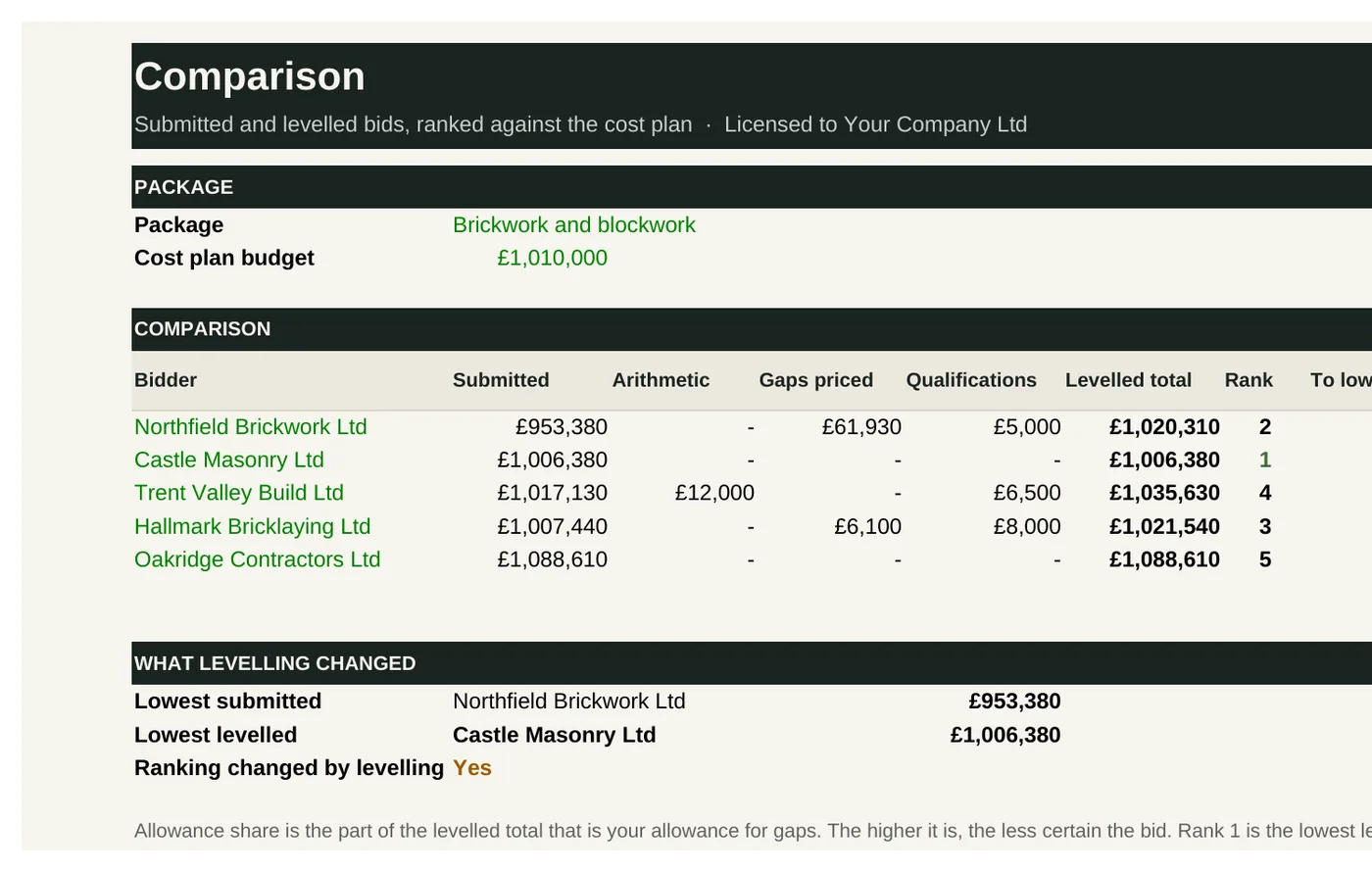
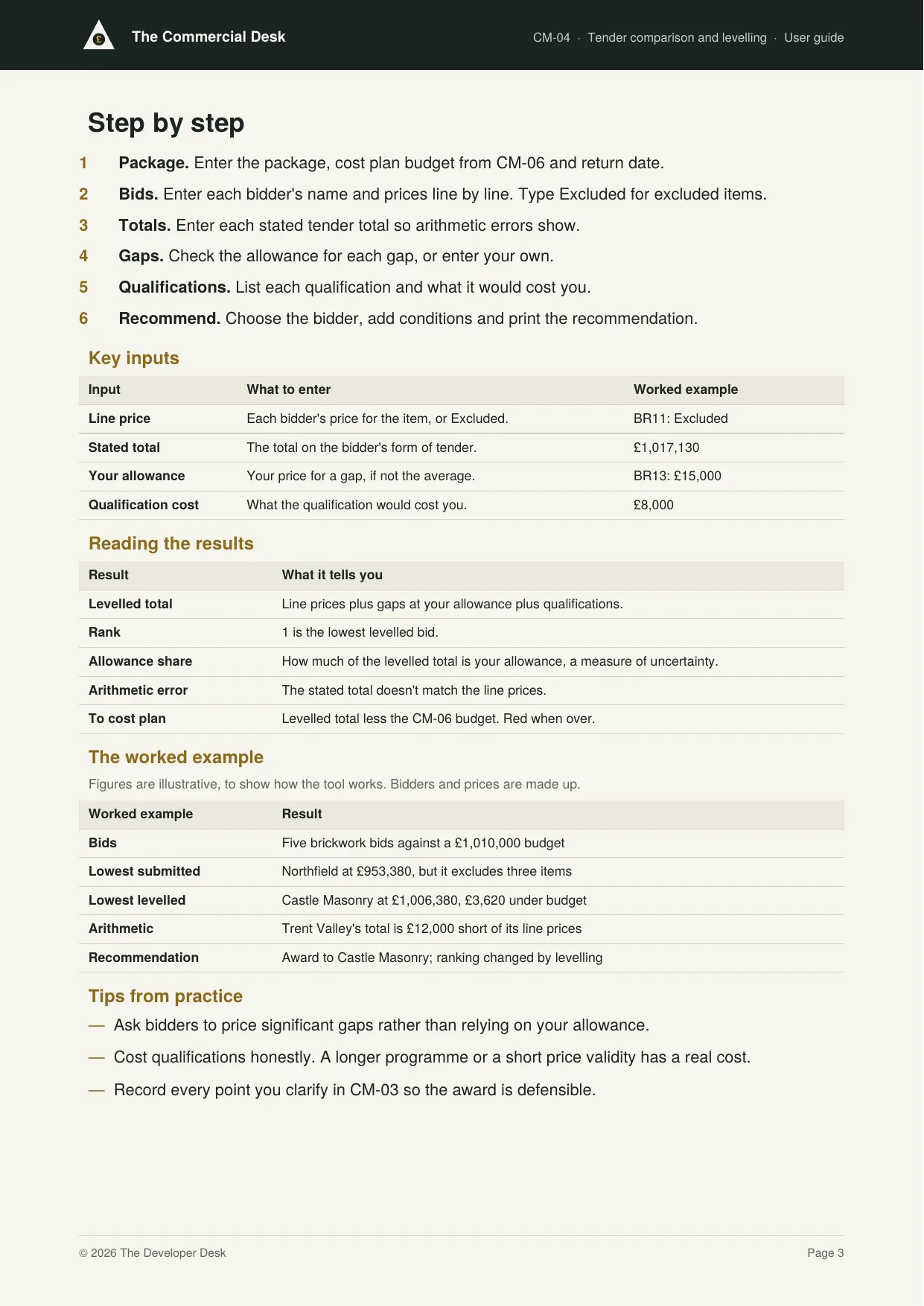
CM-04 takes up to six bids line by line. It corrects arithmetic, prices every gap where a bidder has excluded or missed an item, adds the cost of each qualification, and ranks the levelled bids against your cost plan budget. It then writes a recommendation to award, ready to sign.
Who it's for: Commercial managers and quantity surveyors comparing bids for a package, and directors who approve the award.
You enter: Line price, Stated total, Your allowance, Qualification cost.
You get: Levelled total, Rank, Allowance share, Arithmetic error, To cost plan.
Tabs: Summary · Bids · Levelling · Comparison · Recommendation
Cost planning bundle
Know what it should cost and who to buy from.Approved subcontractor list
Prequalification, insurances, accreditations and performance scores.
CM-05 holds every subcontractor with their trade and prequalification answers, their insurance, accreditation and tax documents, and their performance scores from past packages. It gives each firm an approval status, lists documents expired, expiring or below the cover you need, and ranks firms in a league table.
Who it's for: Commercial and procurement teams who choose who to invite to tender, and directors responsible for health and safety and insurance compliance.
You enter: Warning period, Minimum score, Cover required, Hold.
You get: Approved, Conditional, Not approved, Documents to chase, League table.
Tabs: Summary · Subcontractors · Documents · Performance
Elemental cost plan
By house type, plot and externals, set against the appraisal budget.
CM-06 costs each house type element by element, adds externals, abnormals, preliminaries and contingency, and measures the total against the appraisal budget. It shares the site-wide costs across the plots by floor area to give an all-in cost for every plot, and reports by element, house type and tenure.
Who it's for: Commercial managers and quantity surveyors setting the budget for a site, and directors who need to know whether the build cost still matches the appraisal.
You enter: Element cost, Preliminaries, Contingency, Plot extra.
You get: Variance, £ per sq ft, All-in per plot, By tenure.
Tabs: Summary · Budget · Elements · Plots
Abnormals and externals estimator
Foundations, drainage, roads, walls and utilities, priced from quantities.
CM-07 prices roads, drainage, utilities, landscaping, boundaries, plot externals and abnormals from measured quantities, using a rate library or quotes. It totals cost by area and per plot, shows how much is quoted rather than estimated, checks each abnormal against its TD-04 allowance, and prints a priced schedule.
Who it's for: Commercial managers, quantity surveyors and engineers pricing the site infrastructure and abnormal costs before the groundworks tender.
You enter: Code, Quantity, Quote, Abnormal.
You get: Cost, Confidence, Share quoted, TD-04 check.
Tabs: Summary · Quantities · Rates · Schedule
Build cost benchmark library
£ per sq ft by type and specification, fed by your own tender returns.
CM-08 logs every tender return with its trade, house type, specification, sum, floor area and plots. It works out £ per square foot and £ per plot, brings each up to today's prices with a cost index, and summarises the low, average and high for each trade and specification. You can test any rate against the range.
Who it's for: Commercial teams who want cost plans and land appraisals based on the prices they actually receive, rather than generic published rates.
You enter: Index, Tender sum, Area, Awarded.
You get: £/sq ft today, Low, average, high, Sum of averages, Position.
Tabs: Summary · Returns · Index · Benchmarks
Contract and delivery bundle
Place the orders and control the money on site.Procurement schedule
Package lead times worked back from the build programme.
CM-09 works back from each package's start on site through the lead time, order, review and tender periods to the latest dates to issue, award and order. It forecasts each package forward from where it stands, shows the float or slippage, and draws the procurement programme month by month.
Who it's for: Commercial and procurement managers planning when each package goes out to tender, and construction managers who need trades to arrive on time.
You enter: Lead time, Tender, Review, Actual issue.
You get: Latest order, Latest issue, Forecast order, Slippage.
Tabs: Summary · Packages · Programme
Subcontract order and award pack
Award letter, order and key terms checklist.
CM-10 takes the successful bid from CM-04, records any post-tender adjustments to reach the contract sum, and sets out the programme, payment terms, retention, damages, insurance and the documents that form the order. It writes the award letter and the subcontract order, and a key terms checklist shows what is still to agree before the order is signed.
Who it's for: Commercial managers placing subcontract orders, and directors who sign them.
You enter: Tender sum, Adjustment, Final date for payment, Status.
You get: Contract sum, Savings, Ready to sign, Award letter.
Tabs: Summary · Details · Award · Order · Checklist
Valuations and payment notices
Construction Act timetable, pay-less notices and retentions.
CM-11 values each application for work, variations and materials, deducts retention, contra charges and previous payments, and works out the due date, the payment notice and pay less deadlines and the final date for payment. It writes the payment notice and pay less notice, and a register flags late notices and late or short payments.
Who it's for: Quantity surveyors and commercial managers valuing subcontract applications and issuing payment notices under the Construction Act.
You enter: Gross applied, Work valued, Contra charges, Notice sent.
You get: Due this period, Deadlines, Check, Applied less valued.
Tabs: Summary · Applications · Valuations · Register · Notices
Variations and change control
Instruction log, cost impact and sign-off.
CM-12 logs every instruction that changes a subcontract, with its source, quote, agreed value and approval. It shows variations agreed, pending and disputed for each package, the revised and forecast contract sums, and which variations still need approval at the right level for their value.
Who it's for: Commercial managers and site teams instructing and valuing variations, and directors who approve them.
You enter: Source, Quoted, Agreed or our view, Approved by.
You get: Revised sum, Forecast final, Needs approval, Over limit.
Tabs: Summary · Instructions · Values
Reporting and control bundle
Find the margin while it can still be saved.Cost value reconciliation
Monthly cost against value and margin for each site.
CM-13 compares the value of work done with the cost incurred under each cost head, forecasts the final cost from cost to date, accruals and cost to complete, and shows the variance to budget and the movement since last month. The Summary gives the forecast margin on the development against budget and target.
Who it's for: Commercial managers preparing the monthly cost report, and directors who need the forecast margin on each site.
You enter: Complete, Cost to date, Cost to complete, Last month's forecast.
You get: Over or under, Forecast final, To budget, Margin.
Tabs: Summary · Value · Cost · CVR
Cashflow and funder drawdown
Build spend S-curve against sales and RP receipts, with drawdown requests.
CM-14 forecasts build spend by heading on an S-curve or evenly, uses actual spend for past months, and sets it against sales and registered provider receipts. It applies equity first, draws the facility for the rest, rolls up interest and repays from receipts, then shows peak debt and headroom and writes each month's drawdown request.
Who it's for: Finance and commercial teams forecasting cash on a site, and anyone preparing drawdown requests for a development lender.
You enter: Curve, Actual spend, Completions, Equity in first.
You get: Forecast spend, Drawdown, Peak debt, Headroom.
Tabs: Summary · Spend · Receipts · Facility · Drawdown
Final account and retention release
Closeout agreed trade by trade, with retentions tracked to release.
CM-15 sets each trade's contract sum, agreed variations and contra charges against the final account, shows the balance to pay, and schedules both halves of the retention from practical completion and the end of the defects period. It flags releases due, overdue or held for defects, and the final accounts still open.
Who it's for: Quantity surveyors and commercial managers closing out completed sites, and finance teams forecasting retention releases.
You enter: Agreed final, Status, Practical completion, Defects open.
You get: Final account, Due now, Overdue, Held now.
Tabs: Summary · Accounts · Retentions
Commercial dashboard
One-page board and funder report across every site.
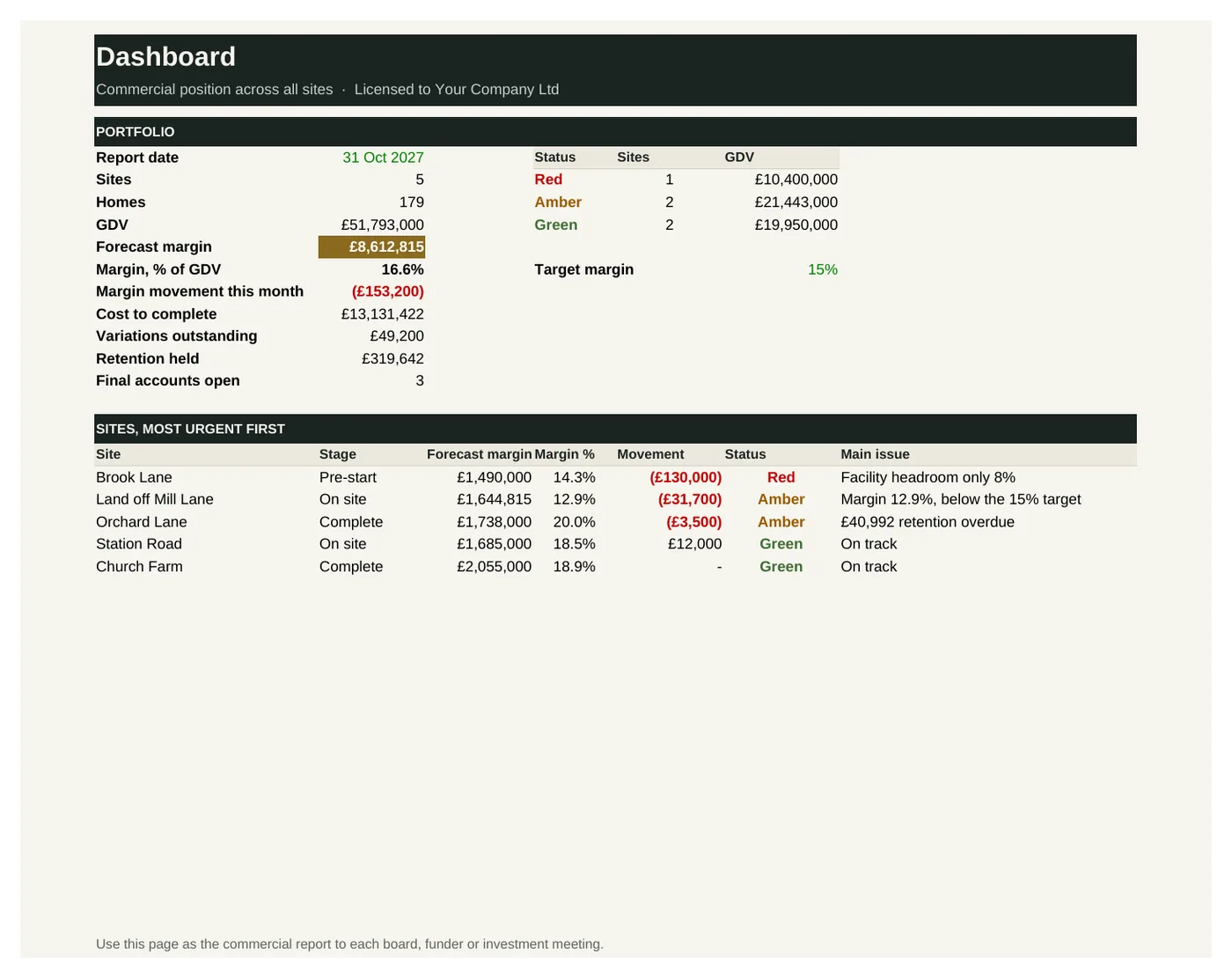
CM-16 brings the headline figures from the other Commercial Desk tools onto one page for up to 20 sites: forecast margin and movement, cost to complete, variations outstanding, facility headroom, retention and open final accounts. Each site gets a red, amber or green status and its main issue, most urgent first.
Who it's for: Managing and commercial directors reporting to a board, funder or investment committee across a portfolio of sites.
You enter: Target margin, Red margin gap, Headroom warning, Movement.
You get: Red, Amber, Green, Main issue.
Tabs: Dashboard · Sites
See inside
Real screens from the workbooks
Taken straight from the tools with the worked example filled in, so you can see exactly what you get before you buy.
In every tool
How it works
1 — Download
Buy a single tool, a bundle or the full desk. Each one is licensed to your company and sent by email.
2 — Set up once
Enter your trades, subcontractors, rates and payment terms using the user guide.
3 — Tender and report
Run every package through the same tender, and take one commercial report to your board each month.
Pricing
Buy what you need, or get everything
Single tool
£95–£295
One workbook with its user guide and worked example.
Start here
Bundle of four
£295–£595
Four tools that work together. The tendering bundle is the place to start.
Full Commercial Desk
£1,495
All 16 tools and guides, yours to keep, with 12 months of updates and the monthly Q&A call. Then £395 a year to keep updating.
The Full Desk
£5,950
All six desks and all 96 tools, yours to keep, with 12 months of updates and the monthly Q&A call. Then £1,190 a year to keep updating.
Founding members: £4,450, with updates at £890 a year for life, for the first 50.
Set-up service
Your figures loaded for you · from £1,500
We load the tools with your own costs, rates, values, house types and approval rules, so they're ready to use from day one.
Prices exclude VAT. Single tools, bundles and desks are for one user and yours to keep. See pricing for every desk
Written by people who have done the job
The Commercial Desk is built by the same professionals as The Land Desk, working with quantity surveyors and commercial directors who have run tenders, valued work on site and agreed final accounts.
Every tool is built from that experience: the controls a well-run commercial team relies on, in a form you can pick up and use the same week.
Become a founding member
The first 50 founding members get The Full Desk, all six desks and 96 tools, for £4,450 instead of £5,950, with updates at £890 a year fixed for life.