For SME developers and their partners
From site investigation to adoption.
Sixteen ready-to-use tools for checking, designing, approving and adopting a site, built by professionals who have found the abnormals before exchange and pushed approvals through to start on site. Excel workbooks with a worked example and a user guide for every one.
Built for the people who check, design and approve sites
SME housebuilders
Find the costs in the ground before you exchange, and keep approvals off the critical path.
Small registered providers
Check what a developer hands you, from drainage to warranty, before you commit to a package.
Engineers and consultants
Run every client's site through the same checks and registers, without rebuilding them each time.
The toolkit
Sixteen tools, from first survey to adopted roads
Every tool is a ready-to-use Excel workbook with a filled-in worked example and a PDF user guide. Buy one tool, a bundle of four or the full desk.
Due diligence bundle
Know the site before you buy it.Technical due diligence checklist
Ground, drainage, access, services, ecology and title constraints, scored and signed off.
TD-01 records 40 technical checks across eight categories: ground, drainage, access and highways, utilities, ecology and trees, contamination, title and legal, and site and setting. For each one you note the status, risk, finding and evidence. You get a red, amber or green rating for the site and for each category, the medium and high risks still open, and the further surveys to commission.
Who it's for: Land and technical teams at SME housebuilders and small RPs checking a site before exchange, and boards that want a consistent technical sign-off.
You enter: Status, Risk, Further survey?, Decision.
You get: Technical rating, By category, Risks to resolve, Surveys to commission.
Tabs: Summary · Checklist
Survey and investigation scheduler
Topo, ground investigation, ecology, trees and UXO, with seasonal windows and costs.
TD-02 schedules up to 18 surveys. It works out the earliest start for each, allowing for the lead time to instruct and any seasonal window, then the date each report will land. It flags reports due after your target date and surveys that must wait for a window, and tracks quotes against your survey budget.
Who it's for: Technical and land teams planning surveys for a bid, exchange or planning submission, and anyone who has lost a season waiting for an ecology window.
You enter: Reports needed by, Lead time, Window, Quote.
You get: Earliest start, Report due, Against target, Last report due, Headroom.
Tabs: Summary · Surveys
Utilities capacity and quotes tracker
Water, sewers, power, gas and telecoms: enquiries, points of connection and quotes.
TD-03 tracks up to 10 utilities through enquiry, capacity response, quote and acceptance. It totals the connection and reinforcement costs, gives the cost per home, and flags any utility with no capacity, an expired quote, or a quote about to expire.
Who it's for: Technical and commercial teams managing utility enquiries and quotes, and anyone pricing a site who needs the connection cost per home.
You enter: Capacity response, Connection quote, Reinforcement, Quote valid until.
You get: Total utilities cost, Per home, Status, Flag.
Tabs: Summary · Utilities
Abnormals and constraints register
Every constraint logged with its risk, owner and cost allowance, ready for the appraisal.
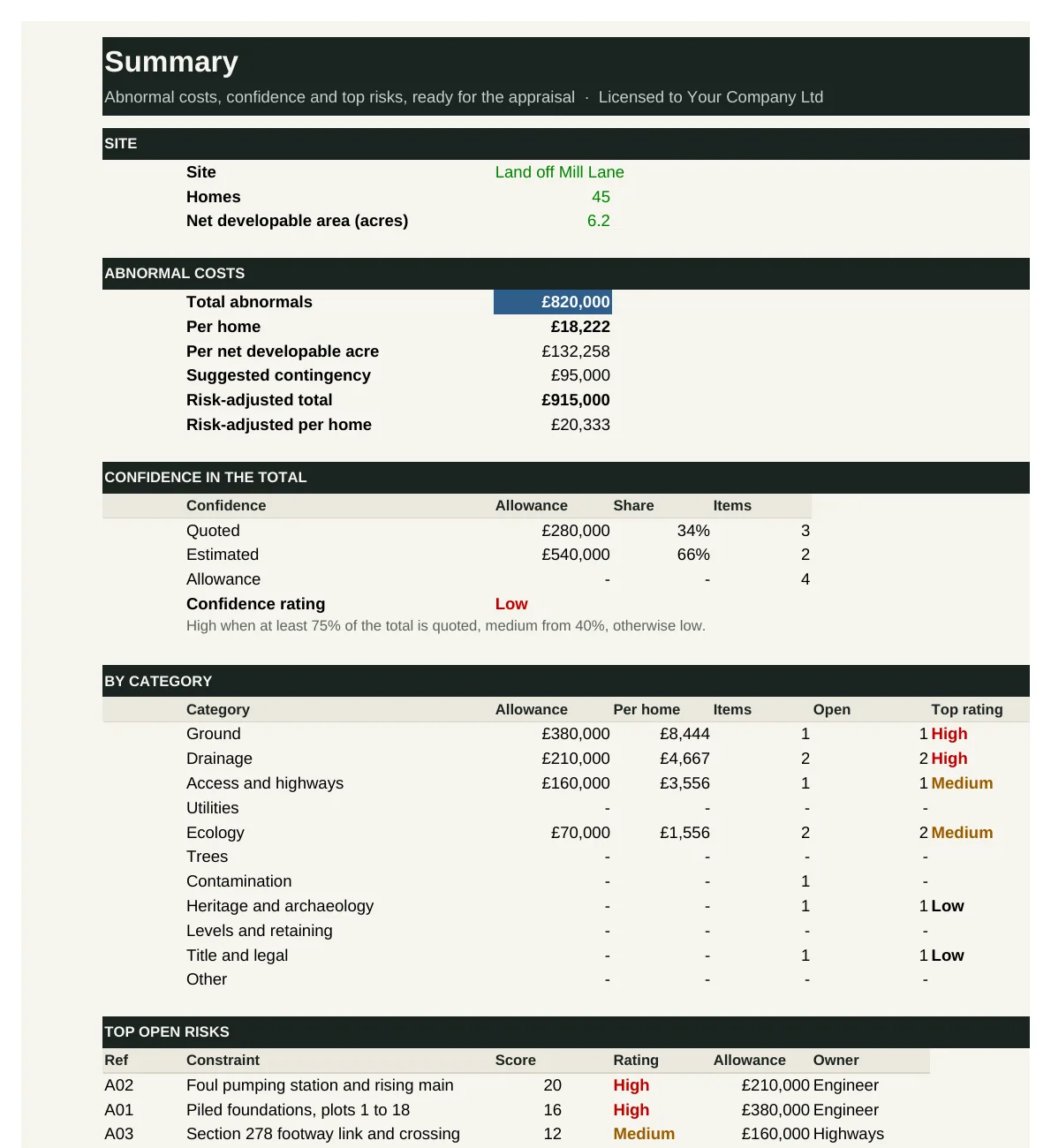
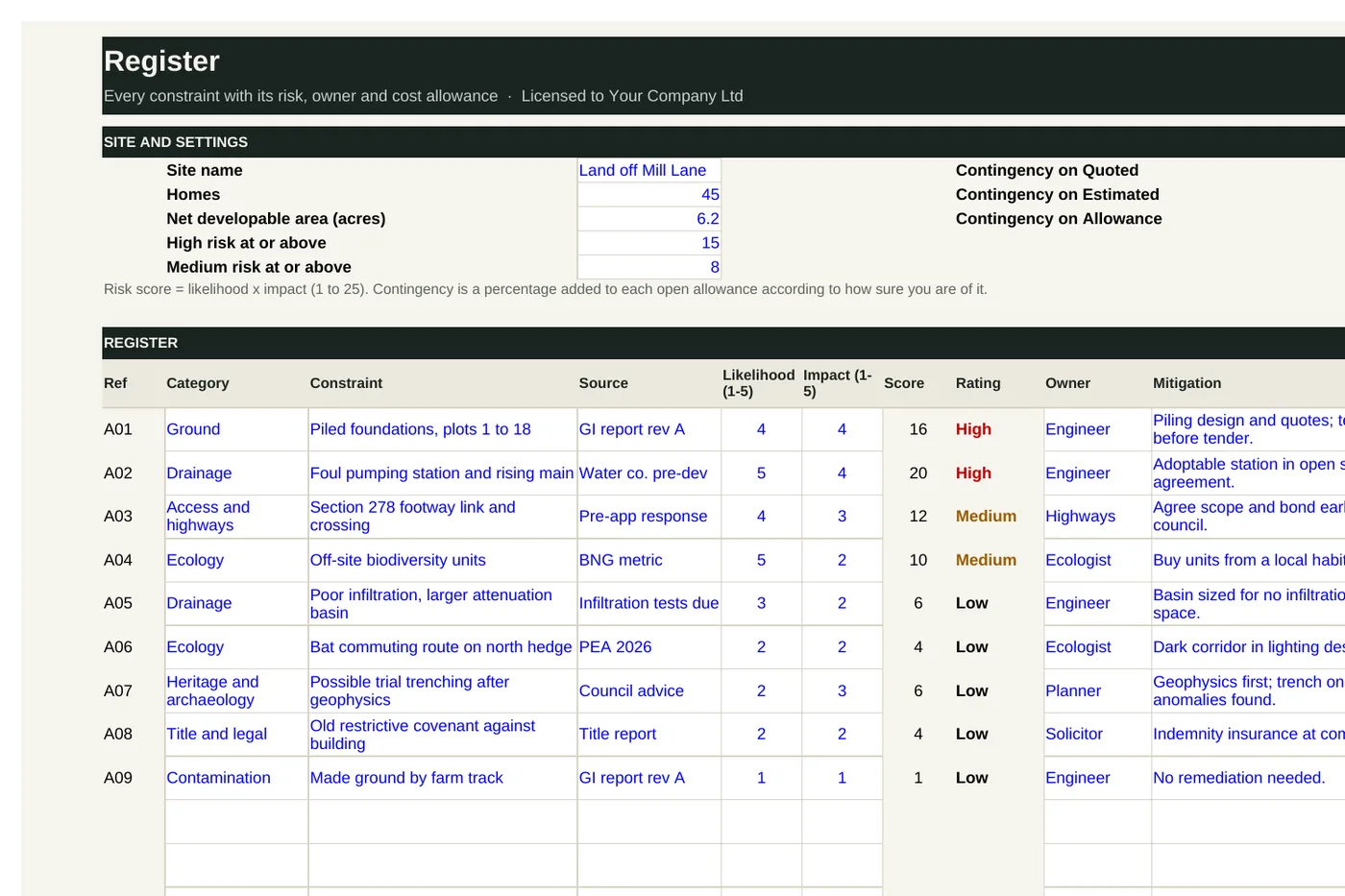
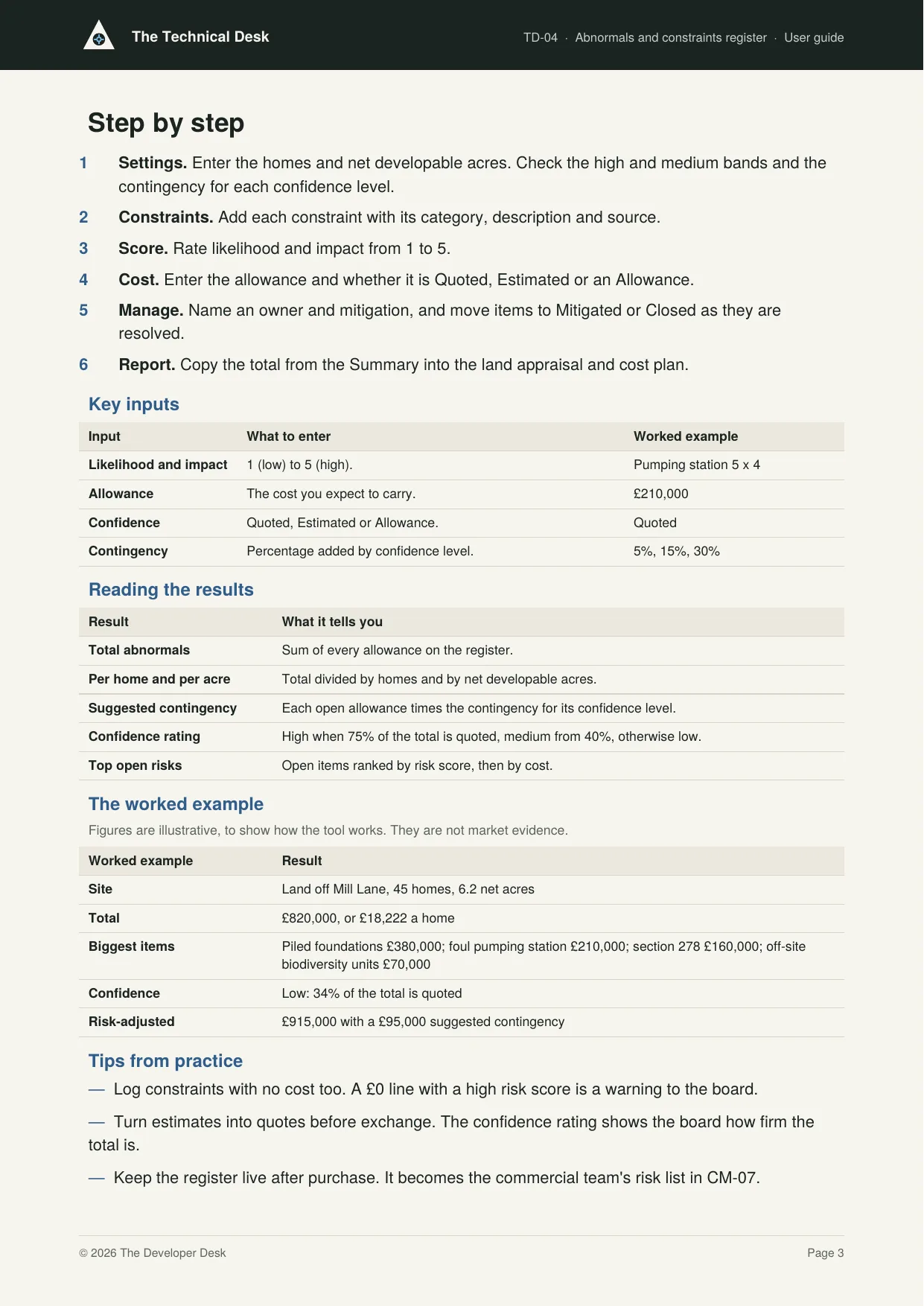
TD-04 is the Technical Desk's flagship tool. It holds up to 30 constraints, each with a likelihood and impact score, owner, mitigation and cost allowance. It totals the abnormals per home and per acre, shows how much of the total is quoted, suggests a contingency for allowances not yet quoted, ranks the top open risks, and plots them on a 5 x 5 risk matrix.
Who it's for: Land, technical and commercial teams pricing a site, and boards and funders who want to see what sits behind the abnormals line in an appraisal.
You enter: Likelihood and impact, Allowance, Confidence, Contingency.
You get: Total abnormals, Per home and per acre, Suggested contingency, Confidence rating, Top open risks.
Tabs: Summary · Register · Risk matrix
Feasibility and design bundle
Prove the access and drainage, then control the design.Access and drainage feasibility log
Highway access, visibility, outfalls, attenuation and levels tested before you bid.
TD-05 compares up to four access options against the visibility the highway authority needs, and checks seven other access questions. On drainage, it works out the allowed discharge, attenuation volume and basin size, then follows the drainage hierarchy for surface water and foul water to the first outfall that works. It totals the access and drainage costs for the abnormals register.
Who it's for: Land and technical teams testing a site before an offer, and anyone who needs a quick view of whether a site can be reached and drained, and at what cost.
You enter: Visibility needed, Visibility achievable, Runoff and storage, Outfall available?.
You get: Feasibility, Preferred access, Basin footprint, Preferred outfalls, For TD-04.
Tabs: Summary · Access · Drainage
Consultant appointment pack
Scopes of service, fee schedule and deliverables for each discipline.
TD-06 holds the fees by stage for up to 14 disciplines, with status, appointment date, insurance and warranties. It compares up to three quotes per discipline, totals fees against your budget, lists the appointments still to make, and writes a short-form appointment letter for any discipline you pick.
Who it's for: Development and technical managers appointing a design team for a site, and directors who sign off consultant fees.
You enter: Fee by stage, Status, PI cover, Scope.
You get: Total fees and per home, Headroom, Fees by stage, To act on, Above lowest.
Tabs: Summary · Fees · Quotes · Letter
Design responsibility matrix
Who designs what, from foundations to plot externals.
TD-07 sets out who leads, contributes to and approves 33 design elements, from layout and foundations to services, drainage, highways and externals, across eight parties. It finds elements with no lead or more than one, shows each party's design load, and tracks every design to approval by the stage it is needed.
Who it's for: Technical managers coordinating a design team and subcontractor design, and commercial teams checking that every element is in someone's scope before tender.
You enter: Responsibility, Needed by, Status.
You get: Check, Gaps and clashes, Design load, By stage.
Tabs: Summary · Matrix
Drawing register and issue control
Revisions, status and issue records across every consultant.
TD-08 records up to 60 drawings with their current revision, status, the date they are needed for construction, the last issue date and open comments. It flags drawings that are overdue or due soon, summarises status by discipline, and keeps a log of every issue sent out.
Who it's for: Technical managers and design coordinators keeping track of drawings across several consultants, and anyone issuing drawings for tender or construction.
You enter: Status, Needed for construction, Open comments.
You get: Check, For construction, By discipline, Issues.
Tabs: Summary · Register · Issues
Change and approvals bundle
Freeze the design and clear the approvals.Design freeze and change log
Freeze points, late changes and their cost and programme impact.
TD-09 sets four design freeze points and logs every change request after them, with its cost and programme impact, who raised it and the decision. It totals approved changes and pending exposure, flags changes raised after the technical design freeze, and lists decisions that have waited too long.
Who it's for: Technical and design managers running a design team, and directors who approve changes and want to see what change is costing the site.
You enter: Freeze dates, Raised by, Cost impact, Decision.
You get: Since freeze, Late change, Approved cost, Pending exposure, Waiting.
Tabs: Summary · Changes
Technical approvals tracker
Section 38, 104 and 278, building control and warranty registration.
TD-10 lists every technical approval a site needs, from building regulations and warranty to highway and sewer agreements and utility connections. It tracks submission and decision dates, flags overdue decisions and those landing after the target start, and totals fees and bonds.
Who it's for: Technical managers chasing approvals for a site, and development directors who need to know whether the start date will hold.
You enter: Needed before, Target decision, Status, Bond.
You get: Blocks start, Overdue, After start, Last decision, Fees and bonds.
Tabs: Summary · Approvals
Planning conditions discharge tracker
Pre-commencement, pre-occupation and compliance conditions.
TD-11 lists every planning condition with its trigger and owner. It works out the latest date to submit each discharge, from the trigger date less the council's decision period and your buffer. It flags late submissions and overdue decisions, and shows the permission's expiry date.
Who it's for: Planning and technical managers discharging conditions after permission, and anyone signing off a start on site.
You enter: Trigger, Decision period, Buffer, Warning window.
You get: Submit by, Late: submit now, Decision overdue, Blocks start, Expiry.
Tabs: Summary · Conditions
Building Regulations and warranty checker
Energy, overheating and EV charging checks by house type, plus warranty inspections.
TD-12 checks up to eight house types against 14 parts of the Building Regulations, from energy and overheating to EV charging, accessibility and broadband. It shows which house types are compliant, which fail and which still have checks to do, and how many plots each affects. It also sets out the warranty registration and inspection stages.
Who it's for: Technical managers and architects taking house types through technical design, and anyone who needs to know which plots are ready to build.
You enter: Plots, Check result, Warranty status, Notice.
You get: Compliant, Fail, Incomplete, Plots affected.
Tabs: Summary · House types · Warranty
Delivery and adoption bundle
Start on time and hand the roads and sewers over.Biodiversity and environmental obligations log
Net gain units, habitat management and monitoring dates.
TD-13 checks your habitat and hedgerow units against the net gain target, using on-site and off-site units. It logs every environmental obligation with its source, owner, how often it repeats and how long it runs. It works out the next due date for each, builds a year-by-year calendar and costs the whole programme.
Who it's for: Technical and planning managers responsible for biodiversity net gain, and the teams who hand over long-term obligations to a management company.
You enter: Units, Repeat every, Runs for, Cost each time.
You get: Net gain, Next due, Overdue, Calendar, Total cost.
Tabs: Summary · Obligations · Calendar
Technical start on site checklist
Consents, approvals and information confirmed before the first dig.
TD-14 lists 30 items that must be in place before a site starts, across planning, approvals, design information, site set-up, health and safety, environment and insurance. It shows readiness overall and by category, lists the blockers, and produces a start on site certificate for three signatories.
Who it's for: Technical, construction and managing directors who sign off a start on site, and the managers who gather the evidence.
You enter: Essential, Status, Evidence, Signatures.
You get: Readiness, Blocker, Overdue, Certificate.
Tabs: Summary · Checklist
Adoptions and bonds tracker
Roads and sewers through technical approval, maintenance and bond release.
TD-15 follows each road and sewer section through technical approval, agreement, completion, maintenance and adoption. It shows the bonds held now, forecasts the bonds held, released and their cost at each year end, and summarises bonds and adoption dates by agreement type.
Who it's for: Technical and commercial managers responsible for road and sewer adoption, and finance teams forecasting bond exposure.
You enter: Bond, Kept after completion, Premium a year, Maintenance.
You get: Adoption, Bond held now, Release forecast, Bond cost, Checks.
Tabs: Summary · Agreements · Release
Technical dashboard
One-page status of risks and approvals across every site.
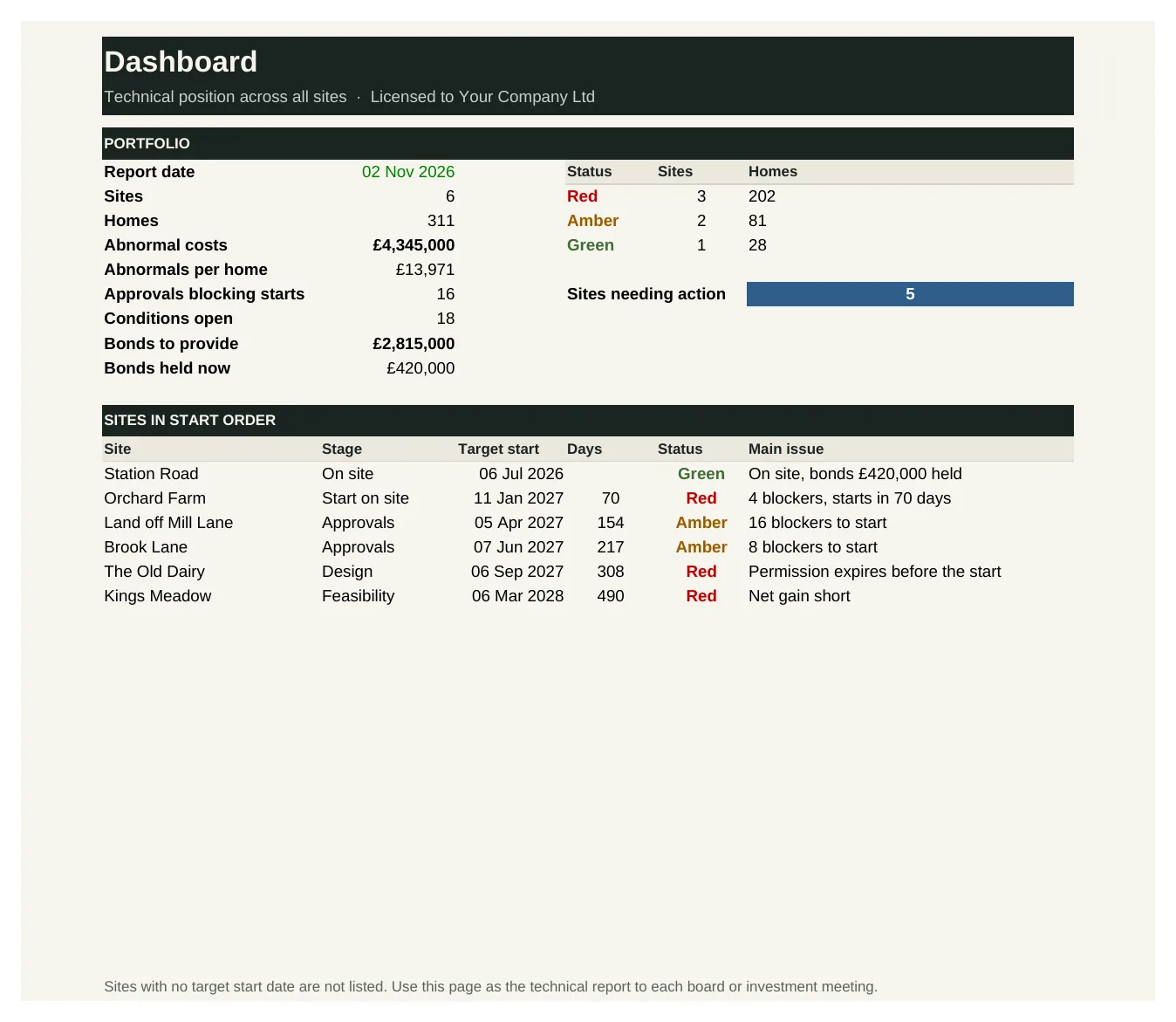
TD-16 brings the headline figures from the other Technical Desk tools onto one page for up to 20 sites: abnormal costs, approvals, conditions, start readiness, bonds and net gain. It gives each site a red, amber or green status with its main issue, and lists the sites in start order.
Who it's for: Technical and managing directors reporting to a board or investment committee, and anyone who needs the technical position across a portfolio of sites.
You enter: Stage, Abnormals, Blockers, Net gain met.
You get: Red, Amber, Green, Main issue.
Tabs: Dashboard · Sites
See inside
Real screens from the workbooks
Taken straight from the tools with the worked example filled in, so you can see exactly what you get before you buy.
In every tool
How it works
1 — Download
Buy a single tool, a bundle or the full desk. Each one is licensed to your company and sent by email.
2 — Set up once
Enter your consultants, approval bodies and standard checks using the user guide.
3 — Check and approve
Run every site through the same checks, and take a clear technical position to your board.
Pricing
Buy what you need, or get everything
Single tool
£95–£295
One workbook with its user guide and worked example.
Start here
Bundle of four
£295–£595
Four tools that work together. The due diligence bundle is the place to start.
Full Technical Desk
£1,495
All 16 tools and guides, yours to keep, with 12 months of updates and the monthly Q&A call. Then £395 a year to keep updating.
The Full Desk
£5,950
All six desks and all 96 tools, yours to keep, with 12 months of updates and the monthly Q&A call. Then £1,190 a year to keep updating.
Founding members: £4,450, with updates at £890 a year for life, for the first 50.
Set-up service
Your figures loaded for you · from £1,500
We load the tools with your own costs, rates, values, house types and approval rules, so they're ready to use from day one.
Prices exclude VAT. Single tools, bundles and desks are for one user and yours to keep. See pricing for every desk
Written by people who have done the job
The Technical Desk is built by the same professionals as The Land Desk, working with technical managers who have run site investigations, appointed design teams and taken roads and sewers through to adoption.
Every tool is built from that experience: the checks and registers a well-run technical team relies on, in a form you can pick up and use the same week.
Become a founding member
The first 50 founding members get The Full Desk, all six desks and 96 tools, for £4,450 instead of £5,950, with updates at £890 a year fixed for life.